App Store Connect API Webhook|CI/CD自動化ワークフローの効果的連携方法
iOS開発者向けにApp Store Connect API Webhookを活用したCI/CD自動化手法を解説。Webhook連携で手動作業を削減し、リリース速度を向上させる具体的ステップを紹介します。
本記事は AI による翻訳をもとに作成されています。表現が不自然な箇所がありましたら、ぜひコメントでお知らせください。
記事一覧
[CI/CD] App Store Connect API Webhook を使った自動化ワークフローの連携
App Store Connect Webhook の活用事例分析と実際の連携使用方法。
{:target="_blank"}](/assets/7c0974856393/1*IqytjX72CmAx9WOx4Rm3gg.webp)
Photo by Volodymyr Hryshchenko
はじめに
蘋果は近年、App Store Connect APIを継続的に拡充しており、開発者にとって大きな恩恵となっています。以前は証明書管理さえも「ハードコア」なWebセッション(期限付きでSMS認証コードも必要)に頼っており、CI/CDへの統合が難しかったです。また、ストアのレビューも不安定なRSSに依存するしかありませんでした。
ここ数年、ほぼ毎年新機能が追加され、開発、テストからデプロイまでのプロセスはもちろん、後期の評価、財務、データレポートも徐々にネイティブ対応が進んでいます。さらに、ユーザー管理、グループ、TestFlightなどの機能も強化され、App Store Connect API が Apple 開発者の開発体験をより向上させることができるようになりました。
WWDC 2025 App Store Connect APIで開発プロセスを自動化する

2025 WWDCでは待望の新機能 — Webhook通知が登場:
ビルドアップロードの状態 (The status of a build upload changes.)
ビルドアップロードの状態が変更されたときに関連データを受け取ります。
Complete / Failed / ProcessingApp バージョンのステータス (The status of an app version changes.)
App バージョンのステータスが変更されたときに関連情報を受け取ります。
Prepare for Submission / Ready for Review / Waiting for Review / Ready for Distribution / Rejected…TestFlight バージョンステータス(New TestFlight feedback はテスターから送信されます。)
テスターがフィードバック(クラッシュレポートやスクリーンショットのフィードバック)を送信した際に関連情報を受け取ります。Apple-hosted のリソースパックの状態変更 (The status of an Apple-hosted asset pack version changes.)
Appleがホストするアセットパックのバージョンに特定の変更があった際に関連情報を受け取ります。
App Store Connect API / Webhook 通知 :
Webhookは、あるシステムがリアルタイムで別のシステムにデータを送信することを可能にします。
Webhookは、あるシステムがネットワークを通じてリアルタイムにデータを別のシステムへ送信する仕組みです。
従来のAPIとは異なり、データを受信する際に一方のシステムがリクエストを送る必要はなく、Webhookはイベント発生時に即座にデータを受信システムへプッシュします。
従来の API と異なり、従来の API はデータを受け取る側が積極的にリクエストを送信する必要がありますが、Webhook はイベント発生時に即座にデータを受信システムにプッシュできます。
Webhookはイベント駆動型で、特定のアクションやイベントが発生した際にトリガーされ、関連データをあらかじめ設定されたURL(「webhook URL」または「callback URL」とも呼ばれる)に即時送信します。
Webhook はイベント駆動型で、特定のアクションやイベントが発生すると、関連データをあらかじめ設定した URL(「Webhook URL」または「Callback URL」とも呼ばれる)にリアルタイムで送信します。
通知Webhookは、サーバー上に作成するエンドポイントです。
通知型Webhookは、自分のサーバー上に作成したエンドポイント(endpoint)です。
このWebhookエンドポイントはApp Store ConnectからのHTTP POSTリクエストを受信します。
このWebhookエンドポイントはApp Store ConnectからのHTTP POSTリクエストを受信します。
POSTリクエストは、アプリに関する重要なイベントを説明します。
これらの POST リクエストは、あなたのアプリに関する重要なイベントを通知します。
Webhook通知エンドポイントを使って、アプリで発生するイベントの通知を設定します。
Webhook通知エンドポイントを使用して、アプリで発生するさまざまなイベントの通知を受け取るように設定できます。
5つの活用事例
1. ビルド処理完了後に審査申請をトリガーする
前:
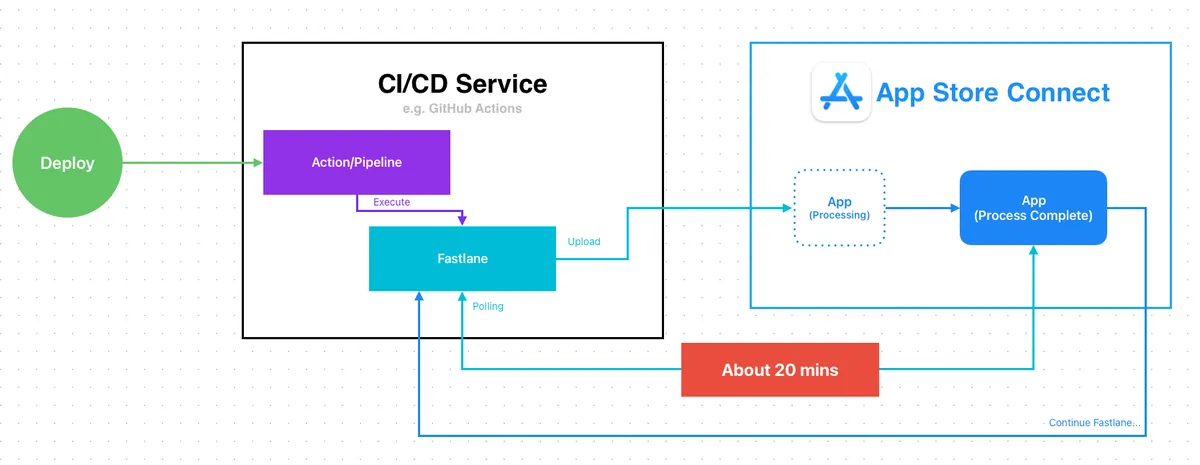
以前、App の CI/CD パッケージ送信審査を実現する際、パッケージをアップロードした後に Apple の処理完了を待つ必要があり、その後で審査を続行していました。Fastlane のデフォルトの方法は、App Store Connect をポーリングしてアップロードしたビルドの状態を確認し、Complete になるまで審査の Lane を続行しません。
待ち時間は約20分 です。Self-hosted CI/CDなら問題ありませんが、クラウドサービスを利用している場合、この20分の待ち時間は非常に無駄なリソースとなります。GitHub Runner macOSの場合、1分あたり0.062ドルなので、審査提出の待ち時間だけで毎回1.24ドルの無駄な費用が発生します。
](/assets/7c0974856393/1*2-Zn2ApgVYd5S5KzxMLEMQ.webp)
Ref: Build Completed Processing 通知信 搭配 Gmail Filter + Google Apps Script
Webhook がまだなく、能動的に通知できなかった時代には、「Build Completed Processing 通知メールを Gmail フィルターと Google Apps Script でトリガーする」方法を使って効果を得ていましたが、少しハードコアな手順でした。
After:
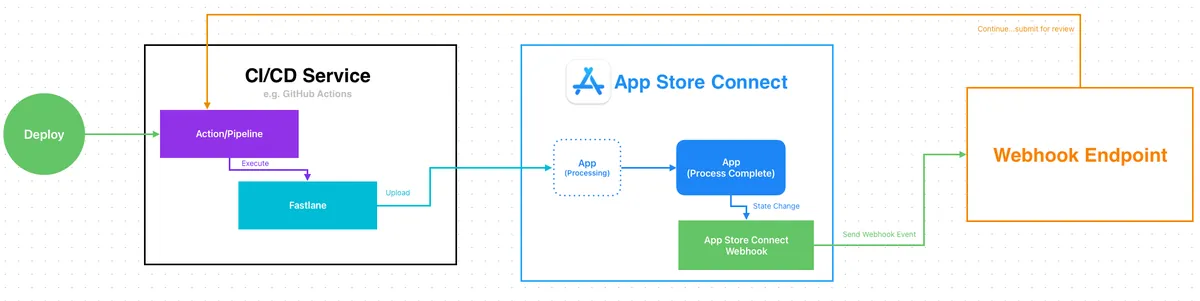
Webhookがあれば、ビルドのアップロードが完了した時点で作業を終了できます。
App Store Connectのビルドプロセス完了後にWebhook通知が送信され、通知を受け取った後に審査申請のステップを続行します。
待ち時間ゼロのコスト
2. GitFlow リリースフローとアプリリリースのタイミングを同期する
前:
GitFlowの最終ステップでは、developブランチをmasterブランチにマージする必要があります。masterブランチは現在の本番バージョンを指します。
以前は定期的に手動または自動で実行するしかありませんでした。例えば、月曜日の午後にAppをリリースし、月曜日に決まってdevelopをmasterにマージするなどです。手動実行は面倒で、自動実行の場合は延期したらどうしますか?月曜日がちょうど休日だったら?実際にはAppがリリースされていないのに、先にdevelopをmasterにマージしてしまうことになります。
ほとんどの場合は重要ではありませんが、例えばこの期間中にホットフィックスを挟むような極端な状況では差異が生じる可能性があります。しかし、完全で安定した CI/CD 開発プロセスを追求する場合、これは検討に値するケースでもあります。
別の方法として、App is Ready for Sale 通知メールを Gmail フィルター+Google Apps Script でトリガーする も可能です。
After:

Webhook があれば、App のリリース通知を受け取った後に直接 CI/CD アクション(Master から Develop へ)をトリガーできます。
App が本当にリリースされたことを確認してから Master に戻すことができます
3. アプリリリースメッセージ
アプリがリリースされユーザーに公開された後、よくある内部ワークフローとして、関連チームへのリリース通知、バージョンに含まれるタスクの共有、関連タスクの完了があります。
前:
同上、手動または定期的な自動実行、もしくはメールを使ってGmailフィルター+Google Apps Scriptでトリガー。
After:
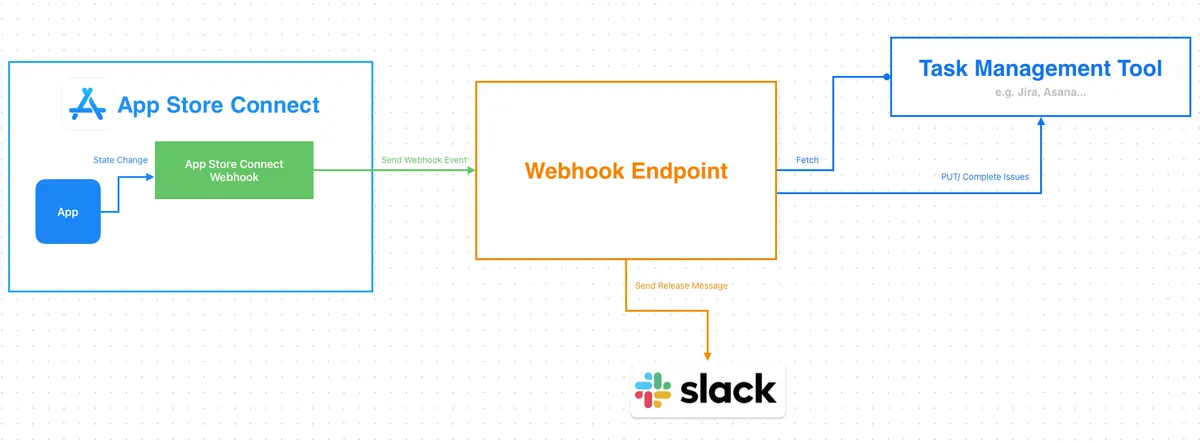
- Webhook があれば、App のリリース通知を受け取った後に Jira/Asana API と連携して該当バージョンのチケットを一括で完了し、完了したタスクのリリースメッセージを Slack に投稿できます。
4. ビルド失敗 / 審査拒否通知器
前述の1、2で、従来はメール通知を通じてワークフローをトリガーする機会があったが、チーム規模が大きく権限管理が厳しい組織では、iOS開発者は「開発者」バックエンド権限のみで、リリースやApp管理ができず、そのためAppの状態変更に関する通知メールを受け取ることもできない。これにはアップロードしたビルドの拒否や審査拒否の通知メールも含まれる。
前:
以前は親切な人(別名 PM)がメールをエンジニアに転送するしかなく、親切な人も気づかなければ、リリース直前にAppがリジェクトされていることに気づくことがありました!
後:
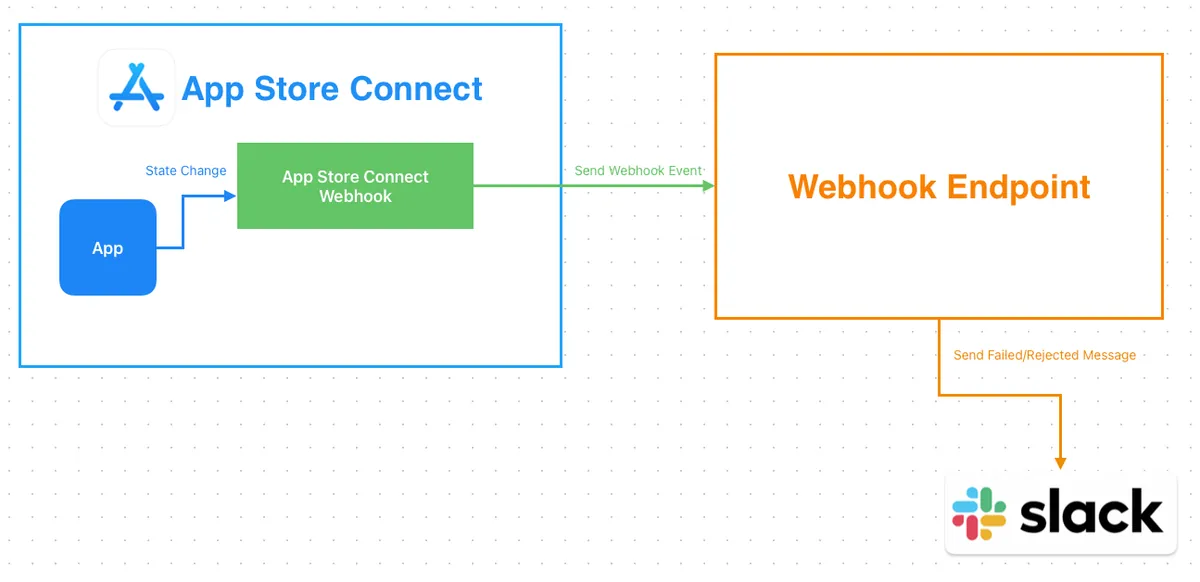
- このケースは比較的簡単で、Webhook通知を受け取った後、メッセージをSlackに転送するだけです。
5. Testflight フィードバック通知機能
4に似ていますが、TestFlightフィードバックWebhook通知に変更したものです。
前:
以前、開発者は自分で App Store Connect の TestFlight 管理画面にアクセスしてテスターのフィードバックやクラッシュ問題を確認するしかなく、非常に見落とされやすかった(1年前に報告された改善案が1年後にようやく見られたこともある)。
After:
- Testflight フィードバック Webhook 通知を受け取った後、メッセージを Slack に転送する。
— — —
その他の活用方法も自由にアイデアを出してください。次に、接続方法について紹介します。
App Store Connect API Webhook 設定
権限要件: Admin、Account Holder 権限が必要です 。
App Store Connect API Webhook 通知の作成
「ユーザーとアクセス (Users and Access)」 -> 「統合 (Integrations)」に移動してください
「その他の統合 (Additional)」の下にある「Webhooks」をクリックしてください
「Webhookを作成」ボタンをクリックしてください
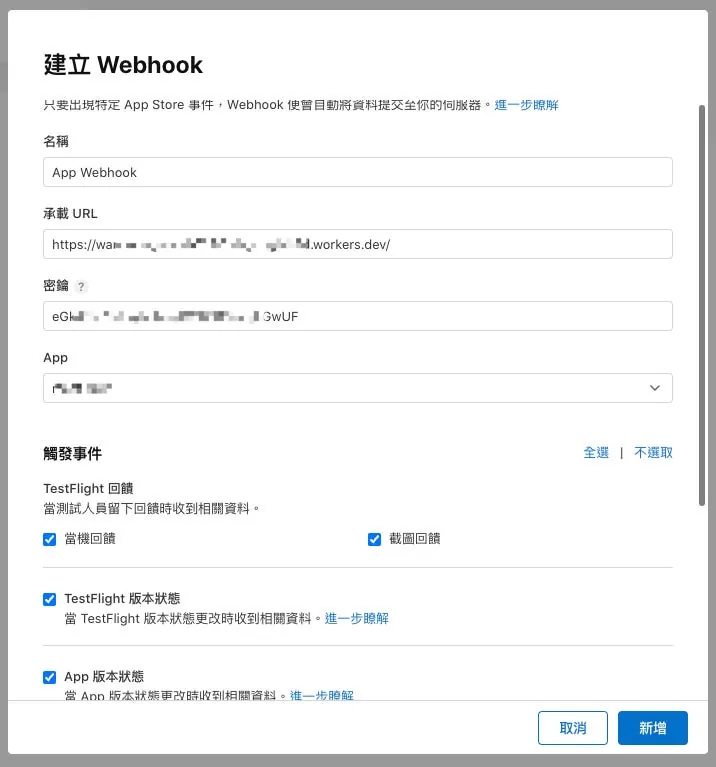
名前:Webhook 名の入力
承載 URL(Payload URL):Webhook 通知を受信するサービスの URL を入力してください
密钥(Secret) 文字列:Webhook リクエスト検証用の秘密鍵(ランダムな文字列を生成して使用可能)
App:Webhook通知を受け取るアプリを選択
トリガーイベント:
1
2
3
4
5
6
7
8
9
10
11
12
13
14
15
16
17
18
19
20
21
TestFlight フィードバック
テスターがフィードバックを残したときに関連情報を受け取ります。
[] クラッシュフィードバック
[] スクリーンショットフィードバック

[] TestFlight バージョンステータス
TestFlight バージョンのステータスが変更されたときに関連情報を受け取ります。詳細はこちら

[] App バージョンステータス
App バージョンのステータスが変更されたときに関連情報を受け取ります。詳細はこちら

[] ビルドアップロードステータス
ビルドアップロードのステータスが変更されたときに関連情報を受け取ります。詳細はこちら

背景素材
Apple がホストするアセットパッケージのバージョンに特定の変更があったときに関連情報を受け取ります。詳細はこちら

[] App Store 公開バージョンの更新
[] 外部 TestFlight 公開バージョンの更新
[] 内部 TestFlight 公開バージョンの作成
[] アセットパッケージバージョンの更新
必要に応じて選択することも、すべて選択して通知を受け取った後に処理するか判断することもできます。
最後に「追加」をクリックしてWebhookを作成します。
App Store Connect API Webhook 通知のテスト
Webhook ページにアクセスします。
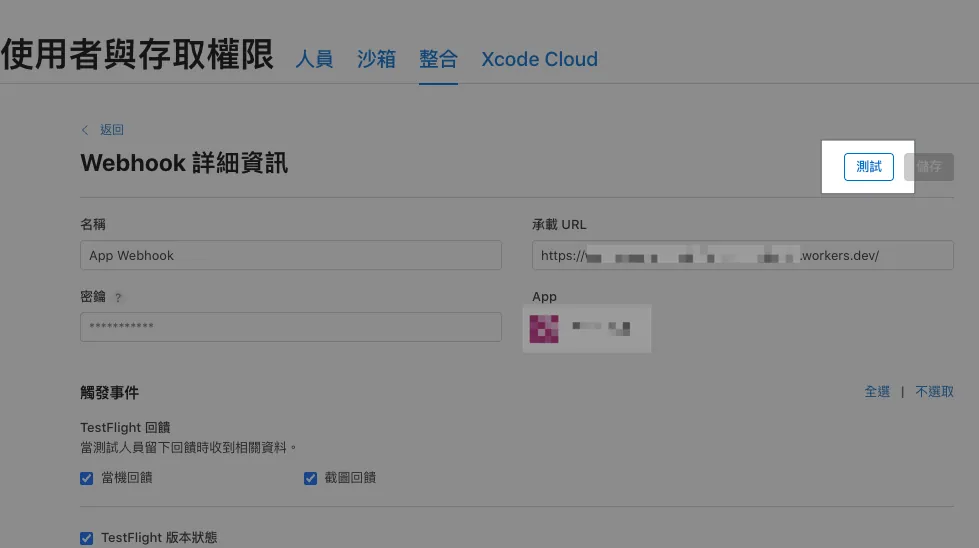
右上の「テスト」をクリックしてテスト通知を受け取ります。
テスト通知内容は以下の通りです:
1
2
3
4
5
6
7
8
9
10
11
12
13
14
15
16
17
18
19
Headers:
{
  "content-type": "application/json",
  "x-apple-jingle-correlation-key": "PNSCHDQW3MY2AX6VSRFHYYNUL4",
  "x-apple-request-uuid": "7b64238e-16db-31a0-5fd5-944a7c61b45f",
  "x-apple-signature": "hmacsha256=cf50020f0bbd3c5274860594f616f1806965c1f9fb765d8d278f512dff5b4c0e",
}

Body:
{
  "data" : {
    "type" : "webhookPingCreated",
    "id" : "65726e27-cb79-47f2-a3e4-c8ced9f356e8",
    "version" : 1,
    "attributes" : {
      "timestamp" : "2025-12-26T15:47:38.472168681Z"
    }
  }
}
App Store Connect API Webhook 通知送信履歴
Webhook ページ下部の「最近の送信項目」には、最近送信された Webhook イベントが表示されます。
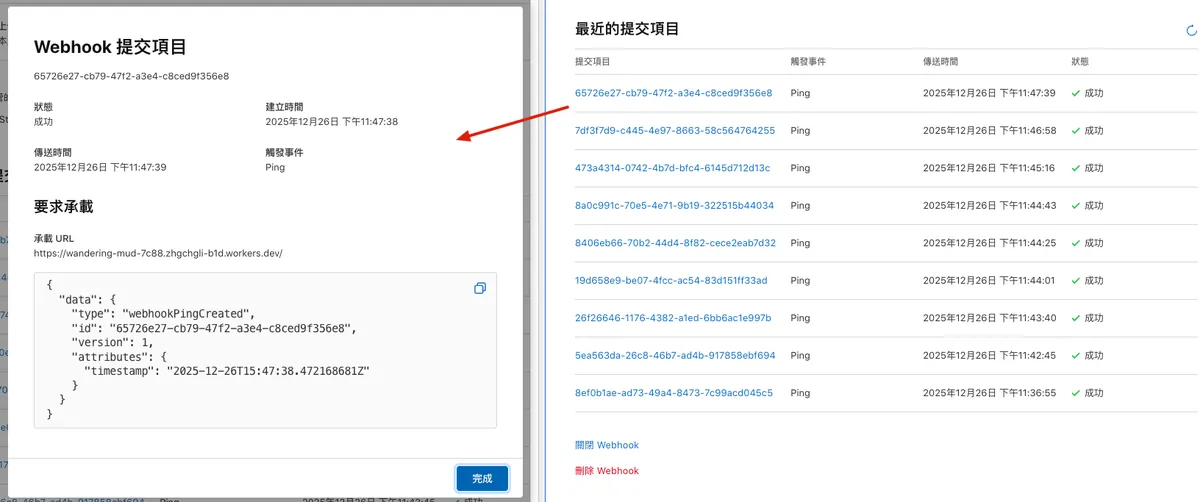
App Store Connect API Webhook 通知の検証
Webhook を作成する際に「シークレット文字列」を入力しました。リクエストの検証を推奨します。これにより、Webhook URL が漏洩しても悪意のある者が勝手に Webhook イベントをあなたのサービスに送信するのを防げます。
検証方法:
Request Body を指定したキー文字列で HMAC-SHA256 し、HEX 形式の文字列に変換します。この文字列と Request Headers の
x-apple-signatureのhmacsha256=に続く文字列を比較します。
実装方法 — Nodejs:
1
2
3
4
5
6
7
8
9
10
import crypto from 'crypto';

function verifyAppleWebhook(rawBody, appleSignature, secret) {
  const hex = crypto
    .createHmac('sha256', secret)
    .update(rawBody, 'utf8')
    .digest('hex');

  return `hmacsha256=${hex}` === appleSignature;
}
実装方法 — Cloudflare Worker:
1
2
3
4
5
6
7
8
9
10
11
12
13
14
15
16
17
18
19
20
21
22
23
24
25
26
27
28
29
30
31
32
33
34
function bufferToHex(buffer) {
  return [...new Uint8Array(buffer)]
    .map(b => b.toString(16).padStart(2, '0'))
    .join('');
}

async function hmacSha256Hex(secret, message) {
  const enc = new TextEncoder();

  const key = await crypto.subtle.importKey(
    'raw',
    enc.encode(secret),
    { name: 'HMAC', hash: 'SHA-256' },
    false,
    ['sign']
  );

  const signature = await crypto.subtle.sign(
    'HMAC',
    key,
    enc.encode(message)
  );

  return bufferToHex(signature);
}

async function verifyAppleWebhook(request, secret) {
  const appleSignature = request.headers.get('X-Apple-Signature'); // Appleの署名を取得

  const rawBody = await request.clone().text(); // リクエストの生データを取得
  const calculated = await hmacSha256Hex(secret, rawBody); // HMAC-SHA256署名を計算

  return "hmacsha256="+calculated === appleSignature; // 署名を比較して検証
}
- Cloudflare Worker には crypto モジュールがないため、Web Crypto API(crypto.subtle)を使用する必要があります。
実装方法 — Google Apps Script Web App ❌
技術的な制限により、Google Apps Script Web App の doGet(e)/doPost(e) ではリクエストヘッダーを取得できないため、この方法でリクエスト元の検証はできません。
URLクエリにキーとなるパラメータを追加して、簡単な判定保護を行うことが最大限です。
App Store Connect API Webhook 通知のペイロード
こちらには、アプリのアップロードや審査申請の過程で受け取るイベントの Payload をいくつか集めました。自動化開発の際に直接参考にしてください。
Webhook はイベントとステータス名のみを送信し、バージョン番号や拒否理由などの詳細情報は含まれません。完全な情報を取得するには、Event Payload 内の Relationships Link を使って自分で App Store Connect API を呼び出す必要があります。
ビルドバージョンアップロード — プロセス完了
1
2
3
4
5
6
7
8
9
10
11
12
13
14
15
16
17
18
19
20
21
22
{
  "data" : {
    "type" : "buildUploadStateUpdated",
    "id" : "xxx-xx-xx-xx-xxx",
    "version" : 1,
    "attributes" : {
      "oldState" : "PROCESSING",
      "newState" : "COMPLETE"
    },
    "relationships" : {
      "instance" : {
        "data" : {
          "type" : "buildUploads",
          "id" : "xxx-xx-xx-xx-xxx"
        },
        "links" : {
          "self" : "https://api.appstoreconnect.apple.com/v1/buildUploads/xxx-xx-xx-xx-xxx"
        }
      }
    }
  }
}
ビルドバージョンアップロード — プロセス失敗
1
2
3
4
5
6
7
8
9
10
11
12
13
14
15
16
17
18
19
20
21
22
{
  "data": {
    "type": "buildUploadStateUpdated",
    "id": "xxx-xx-xx-xx-xxx",
    "version": 1,
    "attributes": {
      "oldState": "PROCESSING",
      "newState": "FAILED"
    },
    "relationships": {
      "instance": {
        "data": {
          "type": "buildUploads",
          "id": "xxx-xx-xx-xx-xxx"
        },
        "links": {
          "self": "https://api.appstoreconnect.apple.com/v1/buildUploads/xxx-xx-xx-xx-xxx"
        }
      }
    }
  }
}
多くはバイナリの拒否で、例えばマイクを使用しているのに宣言していない場合などです。
App バージョンの状態 — Prepare For Submission(提出準備中)
1
2
3
4
5
6
7
8
9
10
11
12
13
14
15
16
17
18
19
20
21
22
23
{
  "data" : {
    "type" : "appStoreVersionAppVersionStateUpdated",
    "id" : "xxx-xx-xx-xx-xxx",
    "version" : 1,
    "attributes" : {
      "newValue" : "PREPARE_FOR_SUBMISSION",
      "oldValue" : "DEVELOPER_REJECTED",
      "timestamp" : "2025-12-18T05:01:47.118Z"
    },
    "relationships" : {
      "instance" : {
        "data" : {
          "type" : "appStoreVersions",
          "id" : "xxx-xx-xx-xx-xxx"
        },
        "links" : {
          "self" : "https://api.appstoreconnect.apple.com/v1/appStoreVersions/xxx-xx-xx-xx-xxx"
        }
      }
    }
  }
}
新しいバージョン番号が作成され、審査提出の準備ができたら、この段階でバージョン情報、更新内容を入力し、審査に提出するビルドを選択できます。
App バージョンの状態 — Ready For Review(審査準備完了)
1
2
3
4
5
6
7
8
9
10
11
12
13
14
15
16
17
18
19
20
21
22
23
{
  "data" : {
    "type" : "appStoreVersionAppVersionStateUpdated",
    "id" : "xxx-xx-xx-xx-xxx",
    "version" : 1,
    "attributes" : {
      "newValue" : "READY_FOR_REVIEW",
      "oldValue" : "PREPARE_FOR_SUBMISSION",
      "timestamp" : "2025-12-18T03:41:12.516Z"
    },
    "relationships" : {
      "instance" : {
        "data" : {
          "type" : "appStoreVersions",
          "id" : "xxx-xx-xx-xx-xxx"
        },
        "links" : {
          "self" : "https://api.appstoreconnect.apple.com/v1/appStoreVersions/xxx-xx-xx-xx-xxx"
        }
      }
    }
  }
}
審査資料が確定し、審査準備が整ったとき。
App バージョンのステータス — Waiting For Review(審査待ち)
1
2
3
4
5
6
7
8
9
10
11
12
13
14
15
16
17
18
19
20
21
22
23
{
  "data" : {
    "type" : "appStoreVersionAppVersionStateUpdated",
    "id" : "xxx-xx-xx-xx-xxx",
    "version" : 1,
    "attributes" : {
      "newValue" : "WAITING_FOR_REVIEW",
      "oldValue" : "READY_FOR_REVIEW",
      "timestamp" : "2025-12-18T03:41:21.179Z"
    },
    "relationships" : {
      "instance" : {
        "data" : {
          "type" : "appStoreVersions",
          "id" : "xxx-xx-xx-xx-xxx"
        },
        "links" : {
          "self" : "https://api.appstoreconnect.apple.com/v1/appStoreVersions/xxx-xx-xx-xx-xxx"
        }
      }
    }
  }
}
App は審査提出が完了し、審査待ちの状態です。
App バージョンの状態 — Developer Rejected(開発者による拒否)
1
2
3
4
5
6
7
8
9
10
11
12
13
14
15
16
17
18
19
20
21
22
23
{
  "data" : {
    "type" : "appStoreVersionAppVersionStateUpdated",
    "id" : "xxx-xx-xx-xx-xxx",
    "version" : 1,
    "attributes" : {
      "newValue" : "DEVELOPER_REJECTED",
      "oldValue" : "WAITING_FOR_REVIEW",
      "timestamp" : "2025-12-18T03:50:30.552Z"
    },
    "relationships" : {
      "instance" : {
        "data" : {
          "type" : "appStoreVersions",
          "id" : "xxx-xx-xx-xx-xxx"
        },
        "links" : {
          "self" : "https://api.appstoreconnect.apple.com/v1/appStoreVersions/xxx-xx-xx-xx-xxx"
        }
      }
    }
  }
}
開発者が審査中のバージョンを取り下げました。
App バージョンのステータス — 審査中(公式が審査中)
1
2
3
4
5
6
7
8
9
10
11
12
13
14
15
16
17
18
19
20
21
22
23
{
  "data" : {
    "type" : "appStoreVersionAppVersionStateUpdated",
    "id" : "xxx-xx-xx-xx-xxx",
    "version" : 1,
    "attributes" : {
      "newValue" : "IN_REVIEW",
      "oldValue" : "WAITING_FOR_REVIEW",
      "timestamp" : "2025-12-18T22:05:50.038Z"
    },
    "relationships" : {
      "instance" : {
        "data" : {
          "type" : "appStoreVersions",
          "id" : "xxx-xx-xx-xx-xxx"
        },
        "links" : {
          "self" : "https://api.appstoreconnect.apple.com/v1/appStoreVersions/xxx-xx-xx-xx-xxx"
        }
      }
    }
  }
}
App バージョンの状態 — Pending Developer Release(審査完了、リリース待ち)
1
2
3
4
5
6
7
8
9
10
11
12
13
14
15
16
17
18
19
20
21
22
23
{
  "data" : {
    "type" : "appStoreVersionAppVersionStateUpdated",
    "id" : "xxx-xx-xx-xx-xxx",
    "version" : 1,
    "attributes" : {
      "newValue" : "PENDING_DEVELOPER_RELEASE",
      "oldValue" : "IN_REVIEW",
      "timestamp" : "2025-12-18T22:34:18.785Z"
    },
    "relationships" : {
      "instance" : {
        "data" : {
          "type" : "appStoreVersions",
          "id" : "xxx-xx-xx-xx-xxx"
        },
        "links" : {
          "self" : "https://api.appstoreconnect.apple.com/v1/appStoreVersions/xxx-xx-xx-xx-xxx"
        }
      }
    }
  }
}
Pending Developer Release イベントの時間から Waiting For Review イベントの時間を引くと、アプリが審査に出されてから公開可能な状態になるまでの待機時間になります。
App バージョンの状態 — Ready for Distribution(App 発売準備完了)a.k.a Ready For Sale
1
2
3
4
5
6
7
8
9
10
11
12
13
14
15
16
17
18
19
20
21
22
23
{
  "data" : {
    "type" : "appStoreVersionAppVersionStateUpdated",
    "id" : "xxx-xx-xx-xx-xxx",
    "version" : 1,
    "attributes" : {
      "newValue" : "READY_FOR_DISTRIBUTION",
      "oldValue" : "PENDING_DEVELOPER_RELEASE",
      "timestamp" : "2025-12-23T06:03:50.925Z"
    },
    "relationships" : {
      "instance" : {
        "data" : {
          "type" : "appStoreVersions",
          "id" : "xxx-xx-xx-xx-xxx"
        },
        "links" : {
          "self" : "https://api.appstoreconnect.apple.com/v1/appStoreVersions/xxx-xx-xx-xx-xxx"
        }
      }
    }
  }
}
App はリリース準備完了(ほぼ Ready For Sale と同義で、Ready For Sale イベントはありません)。
あなたのアプリは承認され、配布の準備が整いました。
アプリを配布するには、契約 が有効である必要があります。アカウントホルダーはビジネスセクションで最新の契約を承認できます。
App Store Connect API Webhook ワークフロー連携
方法 1 — Fastlane を利用して App Store Connect API と連携する
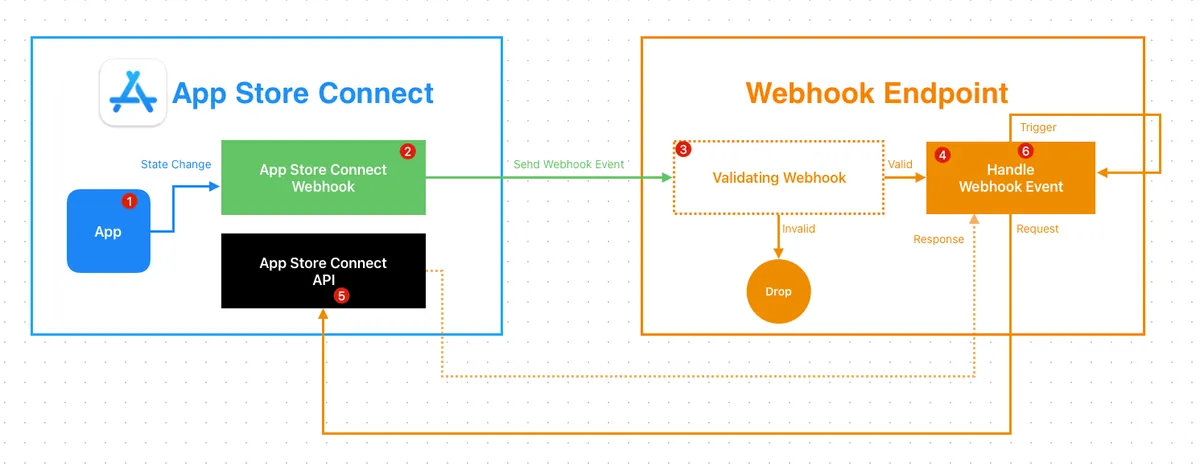
ここで最も速い方法は、CI/CDサービスを直接トリガーし、Fastlaneに内蔵されているSpaceshipを使ってApp Store Connect APIと連携することです。
もしすでに Fastlane で App Store Connect API を使って Match 証明書や審査提出を管理している場合、この方法はそのまま簡単に利用可能です。使っていない場合は、まず 公式ドキュメント を参照して API キーを作成し、CI/CD サービスのシークレットに安全に保存してください。
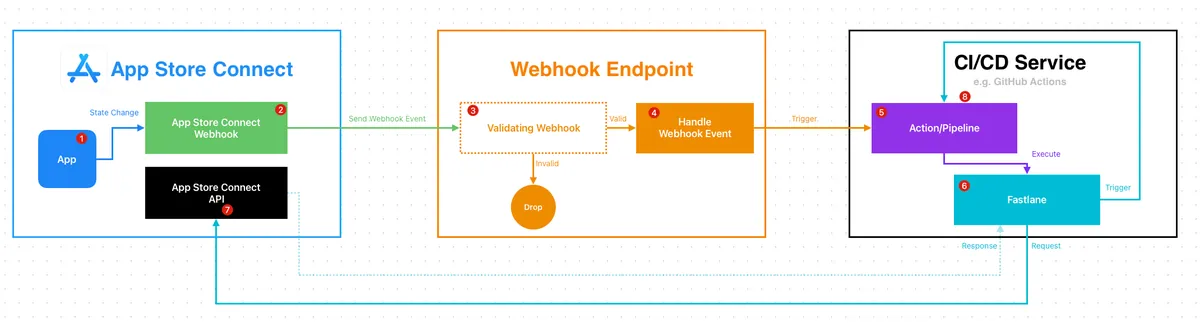
- App Store Connect
- アプリの状態が変わったとき
- Webhookをトリガーする
- Webhook Endpoint
自前のサーバー/API またはシンプルなFAASサービス(Cloudflare Worker / AWS Lambda / Cloud Functions / Google Apps Script)でも可能- Webhookの検証(任意)
- Webhookイベントの処理およびイベントリクエストをCI/CDサービスへ転送して実行
例: GitHub APIを使ってGitHub Actionsをトリガーする..
- CI/CDサービス
GitHub Actions / Bitbucket Pipeline / Gitlab Runner…- アクションをトリガー
- Fastlaneスクリプトを実行し、Fastlane Spaceshipの認証を再利用
- App Store Connect
- App Store Connect APIを使って完全な情報を取得する
- CI/CDサービス
- 次のステップ、例えば通知の送信や別のアクションのトリガー
Fastlane の例:
1
2
3
4
5
6
7
8
9
10
11
12
13
14
15
16
17
18
19
20
21
22
23
24
25
26
27
28
29
30
31
32
33
34
35
36
37
38
39
40
41
42
43
44
45
46
47
48
49
50
51
52
53
54
  # 使用方法:
  #   bundle exec fastlane appStoreConnectWebhookHandler \
  #     data:'{"data":{"type":"buildUploadStateUpdated","id":"xxx-xxx-xxx-xx-xxx","version":1,"attributes":{"oldState":"PROCESSING","newState":"COMPLETE"},"relationships":{"instance":{"data":{"type":"buildUploads","id":"xxx-xxx-xxx-xx-xxx"},"links":{"self":"https://api.appstoreconnect.apple.com/v1/buildUploads/xxx-xxx-xxx-xx-xxx"}}}}}'
  # 注意事項:
  # - `data:` はJSON文字列である必要があります。
  # - このレーンはローカルデバッグ用です(GETレスポンスを出力します)。
  desc "[Automation] App Store ConnectのWebhookペイロードを処理し、ASC APIで関連インスタンスを取得"
  lane :appStoreConnectWebhookHandler do \\|options\\|
    begin
      data = options[:data]
      UI.user_error!("データがありません") if data.empty?
      data = JSON.parse(data)
      url = data.dig("data", "relationships", "instance", "links", "self").to_s.strip
      UI.user_error!("JSONにインスタンスのself URLがありません") if url.empty?

      api_key = app_store_connect_api_key(
        key_id: "xxxx",
        issuer_id: "xxxx-xxxx-xxxx-xxxx-165aa6465141",
        key_filepath: "./AuthKey_xxxx.p8",
        duration: 1200, # オプション(最大1200)
        in_house: false # オプション、match/sigh使用時に必要な場合あり
      )

      loadAppStoreConnectAPIKey
      #
      uri = URI.parse(url)
      http = Net::HTTP.new(uri.host, uri.port)
      http.use_ssl = true
      http.verify_mode = OpenSSL::SSL::VERIFY_PEER
      store = OpenSSL::X509::Store.new
      store.set_default_paths
      http.cert_store = store

      request = Net::HTTP::Get.new(uri.request_uri)
      token = Spaceship::ConnectAPI.token
      UI.user_error!("App Store Connect APIトークンが利用できません。app_store_connect_api_keyの設定を確認してください。") if token.nil?
      request['Authorization'] = "Bearer #{token.text}"

      request['Content-Type'] = 'application/json'
      request['Accept'] = 'application/json'

      response = http.request(request)
      UI.message("📡 GET #{url} レスポンス: [#{response.code}] #{response.message}")
      UI.message(response.body)
      #

      response
      ## レスポンスを処理して次のアクションを実行します...

    rescue => e
        UI.error("❌ App Store Connect API Webhookの処理に失敗しました: #{e}")
    end

  end
方法 2— Webhook エンドポイントで自分で処理する
2つ目の方法はWebhookエンドポイントのサービスで全ての処理を行うことですが、欠点はApp Store Connect APIキーをサービスに置く必要があり、自分でトークン検証を実装しなければならないことです。
Ruby Example:
1
2
3
4
5
6
7
8
9
10
11
12
13
14
15
16
17
18
19
20
21
22
23
24
25
26
27
28
29
30
require 'jwt'
require 'net/http'
require 'time'

keyFile = File.read('./AuthKey_XXXX.p8') # ご自身の.p8秘密鍵ファイルに置き換えてください(App Store Connectからダウンロード)
privateKey = OpenSSL::PKey::EC.new(keyFile)

payload = {
            iss: 'YOUR_ISSUE_ID', # ご自身のIssuer IDに置き換えてください(App Store Connectのユーザーアクセス -> キー -> App Store Connect APIページで取得)
            iat: Time.now.to_i,
            exp: Time.now.to_i + 60*20,
            aud: 'appstoreconnect-v1'
          }

token = JWT.encode payload, privateKey, 'ES256', header_fields={kid:"YOUR_KEY_ID", typ:"JWT"} # ご自身のKey IDに置き換えてください(App Store Connectのユーザーアクセス -> キー -> App Store Connect APIページで取得)
puts token

decoded_token = JWT.decode token, privateKey, true, { algorithm: 'ES256' }
puts decoded_token

# Webhook Payload内のrelationshipsリンクに置き換えてください
uri = URI("https://api.appstoreconnect.apple.com/v1/apps/APPID/customerReviews") # APPIDをApp Store ConnectのアプリIDに置き換えてください -> ご自身のアプリ -> アプリ情報 -> Apple ID
https = Net::HTTP.new(uri.host, uri.port)
https.use_ssl = true

request = Net::HTTP::Get.new(uri)
request['Authorization'] = "Bearer #{token}";

response = https.request(request)
puts response.read_body
App Store Connect API キーの生成方法、トークンの生成方法、API の使用については「App Store Connect API 現已支援 讀取和管理 Customer Reviews」を参照してください。
App Store Connect API のレスポンス
ここに、Webhook イベントを受け取った後に Relationships Link を使って完全な情報を取得する際のレスポンス例をいくつか示します。
ビルドバージョンアップロード — プロセス完了
https://api.appstoreconnect.apple.com/v1/buildUploads/xxx-xx-xx-xx-xxx
1
2
3
4
5
6
7
8
9
10
11
12
13
14
15
16
17
18
19
20
21
22
23
24
25
26
27
28
29
30
31
32
33
{
  "data": {
    "type": "buildUploads",
    "id": "xx-xx-xx-xxx-xx",
    "attributes": {
      "cfBundleShortVersionString": "1.101.0",
      "cfBundleVersion": "1",
      "createdDate": "2025-12-25T08:26:43-08:00",
      "state": {
        "errors": [],
        "warnings": [],
        "infos": [],
        "state": "COMPLETE"
      },
      "platform": "IOS",
      "uploadedDate": "2025-12-25T08:28:35-08:00"
    },
    "relationships": {
      "buildUploadFiles": {
        "links": {
          "self": "https://api.appstoreconnect.apple.com/v1/buildUploads/xx-xx-xx-xxx-xx/relationships/buildUploadFiles",
          "related": "https://api.appstoreconnect.apple.com/v1/buildUploads/xx-xx-xx-xxx-xx/buildUploadFiles"
        }
      }
    },
    "links": {
      "self": "https://api.appstoreconnect.apple.com/v1/buildUploads/xx-xx-xx-xxx-xx"
    }
  },
  "links": {
    "self": "https://api.appstoreconnect.apple.com/v1/buildUploads/xx-xx-xx-xxx-xx"
  }
}
ビルドバージョンアップロード — プロセス失敗
https://api.appstoreconnect.apple.com/v1/buildUploads/xxx-xx-xx-xx-xxx
1
2
3
4
5
6
7
8
9
10
11
12
13
14
15
16
17
18
19
20
21
22
23
24
25
26
27
28
29
30
31
32
33
34
35
36
37
38
{
  "data": {
    "type": "buildUploads",
    "id": "xx-xx-xx-xx-xxx",
    "attributes": {
      "cfBundleShortVersionString": "1.101.0",
      "cfBundleVersion": "3",
      "createdDate": "2025-12-12T09:03:32-08:00",
      "state": {
        "errors": [
          {
            "code": "90683",
            "description": "Info.plistに目的の文字列がありません。アプリのコードは、ユーザーの機密データにアクセスする1つ以上のAPIを参照しているか、またはそのようなアクセスを許可する権限を持っています。\"My.app\"バンドルのInfo.plistファイルには、アプリがデータを必要とする理由を明確かつ完全に説明するユーザー向けの目的文字列を含むNSMicrophoneUsageDescriptionキーが必要です。外部ライブラリやSDKを使用している場合、それらが目的の文字列を必要とするAPIを参照している可能性があります。アプリがこれらのAPIを使用していなくても、目的の文字列は必要です。詳細は以下を参照してください:https://developer.apple.com/documentation/uikit/protecting_the_user_s_privacy/requesting_access_to_protected_resources."
          }
        ],
        "warnings": [],
        "infos": [],
        "state": "FAILED"
      },
      "platform": "IOS",
      "uploadedDate": "2025-12-12T09:05:26-08:00"
    },
    "relationships": {
      "buildUploadFiles": {
        "links": {
          "self": "https://api.appstoreconnect.apple.com/v1/buildUploads/xx-xx-xx-xx-xxx/relationships/buildUploadFiles",
          "related": "https://api.appstoreconnect.apple.com/v1/buildUploads/xx-xx-xx-xx-xxx/buildUploadFiles"
        }
      }
    },
    "links": {
      "self": "https://api.appstoreconnect.apple.com/v1/buildUploads/xx-xx-xx-xx-xxx"
    }
  },
  "links": {
    "self": "https://api.appstoreconnect.apple.com/v1/buildUploads/xx-xx-xx-xx-xxx"
  }
}
ITMS-90683 の例。
App バージョンの状態
https://api.appstoreconnect.apple.com/v1/appStoreVersions/xxx-xx-xx-xx-xxx
1
2
3
4
5
6
7
8
9
10
11
12
13
14
15
16
17
18
19
20
21
22
23
24
25
26
27
28
29
30
31
32
33
34
35
36
37
38
39
40
41
42
43
44
45
46
47
48
49
50
51
52
53
54
55
56
57
58
59
60
61
62
63
64
65
66
67
68
69
70
71
72
73
74
75
76
77
78
79
80
81
82
83
84
85
86
87
88
89
90
91
92
93
94
95
96
97
98
99
100
101
102
103
104
105
{
  "data": {
    "type": "appStoreVersions",
    "id": "xxx-xxx-xxx-xxx",
    "attributes": {
      "platform": "IOS",
      "versionString": "1.101.0",
      "appStoreState": "READY_FOR_SALE",
      "appVersionState": "READY_FOR_DISTRIBUTION",
      "copyright": "© 2025 ZhgChgLi.",
      "reviewType": "APP_STORE",
      "releaseType": "MANUAL",
      "earliestReleaseDate": null,
      "usesIdfa": null,
      "downloadable": true,
      "createdDate": "2025-12-15T19:12:55-08:00"
    },
    "relationships": {
      "ageRatingDeclaration": {
        "links": {
          "self": "https://api.appstoreconnect.apple.com/v1/appStoreVersions/xxx-xxx-xxx-xxx/relationships/ageRatingDeclaration",
          "related": "https://api.appstoreconnect.apple.com/v1/appStoreVersions/xxx-xxx-xxx-xxx/ageRatingDeclaration"
        }
      },
      "appStoreVersionLocalizations": {
        "links": {
          "self": "https://api.appstoreconnect.apple.com/v1/appStoreVersions/xxx-xxx-xxx-xxx/relationships/appStoreVersionLocalizations",
          "related": "https://api.appstoreconnect.apple.com/v1/appStoreVersions/xxx-xxx-xxx-xxx/appStoreVersionLocalizations"
        }
      },
      "build": {
        "links": {
          "self": "https://api.appstoreconnect.apple.com/v1/appStoreVersions/xxx-xxx-xxx-xxx/relationships/build",
          "related": "https://api.appstoreconnect.apple.com/v1/appStoreVersions/xxx-xxx-xxx-xxx/build"
        }
      },
      "appStoreVersionPhasedRelease": {
        "links": {
          "self": "https://api.appstoreconnect.apple.com/v1/appStoreVersions/xxx-xxx-xxx-xxx/relationships/appStoreVersionPhasedRelease",
          "related": "https://api.appstoreconnect.apple.com/v1/appStoreVersions/xxx-xxx-xxx-xxx/appStoreVersionPhasedRelease"
        }
      },
      "gameCenterAppVersion": {
        "links": {
          "self": "https://api.appstoreconnect.apple.com/v1/appStoreVersions/xxx-xxx-xxx-xxx/relationships/gameCenterAppVersion",
          "related": "https://api.appstoreconnect.apple.com/v1/appStoreVersions/xxx-xxx-xxx-xxx/gameCenterAppVersion"
        }
      },
      "routingAppCoverage": {
        "links": {
          "self": "https://api.appstoreconnect.apple.com/v1/appStoreVersions/xxx-xxx-xxx-xxx/relationships/routingAppCoverage",
          "related": "https://api.appstoreconnect.apple.com/v1/appStoreVersions/xxx-xxx-xxx-xxx/routingAppCoverage"
        }
      },
      "appStoreReviewDetail": {
        "links": {
          "self": "https://api.appstoreconnect.apple.com/v1/appStoreVersions/xxx-xxx-xxx-xxx/relationships/appStoreReviewDetail",
          "related": "https://api.appstoreconnect.apple.com/v1/appStoreVersions/xxx-xxx-xxx-xxx/appStoreReviewDetail"
        }
      },
      "appStoreVersionSubmission": {
        "links": {
          "self": "https://api.appstoreconnect.apple.com/v1/appStoreVersions/xxx-xxx-xxx-xxx/relationships/appStoreVersionSubmission",
          "related": "https://api.appstoreconnect.apple.com/v1/appStoreVersions/xxx-xxx-xxx-xxx/appStoreVersionSubmission"
        }
      },
      "appClipDefaultExperience": {
        "links": {
          "self": "https://api.appstoreconnect.apple.com/v1/appStoreVersions/xxx-xxx-xxx-xxx/relationships/appClipDefaultExperience",
          "related": "https://api.appstoreconnect.apple.com/v1/appStoreVersions/xxx-xxx-xxx-xxx/appClipDefaultExperience"
        }
      },
      "appStoreVersionExperiments": {
        "links": {
          "self": "https://api.appstoreconnect.apple.com/v1/appStoreVersions/xxx-xxx-xxx-xxx/relationships/appStoreVersionExperiments",
          "related": "https://api.appstoreconnect.apple.com/v1/appStoreVersions/xxx-xxx-xxx-xxx/appStoreVersionExperiments"
        }
      },
      "appStoreVersionExperimentsV2": {
        "links": {
          "self": "https://api.appstoreconnect.apple.com/v1/appStoreVersions/xxx-xxx-xxx-xxx/relationships/appStoreVersionExperimentsV2",
          "related": "https://api.appstoreconnect.apple.com/v1/appStoreVersions/xxx-xxx-xxx-xxx/appStoreVersionExperimentsV2"
        }
      },
      "customerReviews": {
        "links": {
          "self": "https://api.appstoreconnect.apple.com/v1/appStoreVersions/xxx-xxx-xxx-xxx/relationships/customerReviews",
          "related": "https://api.appstoreconnect.apple.com/v1/appStoreVersions/xxx-xxx-xxx-xxx/customerReviews"
        }
      },
      "alternativeDistributionPackage": {
        "links": {
          "self": "https://api.appstoreconnect.apple.com/v1/appStoreVersions/xxx-xxx-xxx-xxx/relationships/alternativeDistributionPackage",
          "related": "https://api.appstoreconnect.apple.com/v1/appStoreVersions/xxx-xxx-xxx-xxx/alternativeDistributionPackage"
        }
      }
    },
    "links": {
      "self": "https://api.appstoreconnect.apple.com/v1/appStoreVersions/xxx-xxx-xxx-xxx"
    }
  },
  "links": {
    "self": "https://api.appstoreconnect.apple.com/v1/appStoreVersions/xxx-xxx-xxx-xxx"
  }
}
前述のとおり、詳細なアプリ情報、バージョン番号、エラー原因はすべてAPIで取得する必要があります。
完了
これで、App Store Connect API Webhook を使って、App の CI/CD と自動化ワークフローをより良く整備し、チームの開発効率を向上させることができます。
関連記事
ご質問やご意見がありましたら、お問い合わせ ください。
Post MediumからZMediumToMarkdownによって変換されました。
本記事は Medium にて初公開されました(こちらからオリジナル版を確認)。ZMediumToMarkdown による自動変換・同期技術を使用しています。