
iOS ≥ 18 NSAttributedString attributes Range のマージにおける挙動の変更
iOS 18以降、NSAttributedStringの属性範囲の結合にEquatableが参照されるように変更

写真提供:C M
問題の原因
iOS 18 が 2024/9/17 にリリースされた後、以前作成したオープンソースプロジェクト ZMarkupParser にて、iOS 18 で一部の HTML を解析するとクラッシュするという報告が開発者からありました。
この Issue を見て少し混乱しました。以前は問題なかったのに、iOS 18 からクラッシュするようになったのは理にかなっていません。おそらく iOS 18 の基盤である Foundation に何か変更があったためだと思います。
クラッシュトレース
Trace Code 後にクラッシュ問題の箇所を特定したところ、.breaklinePlaceholder 属性を走査し、Range に対して削除操作を行う際にクラッシュが発生していることがわかりました:
mutableAttributedString.enumerateAttribute(.breaklinePlaceholder, in: NSMakeRange(0, NSMakeRange(0, mutableAttributedString.string.utf16.count))) { value, range, _ in
  // ...条件分岐...
  // mutableAttributedString.deleteCharacters(in: preRange)
  // ...条件分岐...
  // mutableAttributedString.deleteCharacters(in: range)
}
*** 'NSRangeException' 例外がキャッチされずにアプリが終了しました。理由: 'NSMutableRLEArray replaceObjectsInRange:withObject:length:: 範囲外エラー'
.breaklinePlaceholder は私が独自に拡張した NSAttributedString.Key で、HTML タグ情報をマークし、改行記号の使用を最適化するためのものです:
struct BreaklinePlaceholder: OptionSet {
    let rawValue: Int

    static let tagBoundaryPrefix = BreaklinePlaceholder(rawValue: 1) // タグ境界の接頭辞
    static let tagBoundarySuffix = BreaklinePlaceholder(rawValue: 2) // タグ境界の接尾辞
    static let breaklineTag = BreaklinePlaceholder(rawValue: 3)      // 改行タグ
}

extension NSAttributedString.Key {
    static let breaklinePlaceholder: NSAttributedString.Key = .init("breaklinePlaceholder")
}
しかし、問題の核心はここではありません 。なぜなら、iOS 17 以前では、入力された
mutableAttributedStringに対して上記の操作を行っても問題がなかったためです。つまり、iOS 18 では入力データの内容が変わっていることを意味します。
NSAttributedString の属性: [NSAttributedString.Key: Any?]
問題を深掘りする前に、まず NSAttributedString の attributes の結合メカニズムについて紹介します。
NSAttributedString attributes は .key が同じ隣接する Range Attributes オブジェクトを自動的に比較し、同じであれば一つの Attribute に統合します。例えば:
let mutableAttributedString = NSMutableAttributedString(string: "", attributes: nil)
mutableAttributedString.append(NSAttributedString(string: "<div>", attributes: [.font: UIFont.systemFont(ofSize: 14)]))
mutableAttributedString.append(NSAttributedString(string: "<div>", attributes: [.font: UIFont.systemFont(ofSize: 14)]))
mutableAttributedString.append(NSAttributedString(string: "<p>", attributes: [.font: UIFont.systemFont(ofSize: 14)]))
mutableAttributedString.append(NSAttributedString(string: "Test", attributes: [.font: UIFont.systemFont(ofSize: 12)]))
最終 Attributes の結合結果:
<div><div><p>{
    NSFont = "<UICTFont: 0x101d13400> font-family: \".SFUI-Regular\"; font-weight: normal; font-style: normal; font-size: 14.00pt";
}Test{
    NSFont = "<UICTFont: 0x101d13860> font-family: \".SFUI-Regular\"; font-weight: normal; font-style: normal; font-size: 12.00pt";
}
enumerateAttribute(.breaklinePlaceholder...) を実行すると、以下の結果が得られます:
NSRange {0, 13}: <UICTFont: 0x101d13400> font-family: ".SFUI-Regular"; font-weight: normal; font-style: normal; font-size: 14.00pt
NSRange {13, 4}: <UICTFont: 0x101d13860> font-family: ".SFUI-Regular"; font-weight: normal; font-style: normal; font-size: 12.00pt
NSAttributedString attributes の結合 — 基盤実装の推測
推測内部では Set<Hashable> を Attributes のコンテナとして使用しており、同じ Attribute オブジェクトを自動的に排除していると思われます。
しかし利便性のために、NSAttributedString attributes: [NSAttributedString.Key: Any?] のValueオブジェクトは Any? 型として宣言されており、Hashableの制約はありません。
そのため、システムは内部で as? Hashable に準拠しているかを確認し、Set を使ってオブジェクトを統合管理していると推測されます。
今回の iOS 18以降の調整差異の推測は、ここでの内部実装の問題です。
以下は私たちがカスタムした .breaklinePlaceholder 属性を例にしたものです:
struct BreaklinePlaceholder: Equatable {
    let rawValue: Int

    static let tagBoundaryPrefix = BreaklinePlaceholder(rawValue: 1)
    static let tagBoundarySuffix = BreaklinePlaceholder(rawValue: 2)
    static let breaklineTag = BreaklinePlaceholder(rawValue: 3)
}

extension NSAttributedString.Key {
    static let breaklinePlaceholder: NSAttributedString.Key = .init("breaklinePlaceholder")
}

//

let mutableAttributedString = NSMutableAttributedString(string: "", attributes: nil)
mutableAttributedString.append(NSAttributedString(string: "<div>", attributes: [.breaklinePlaceholder: NSAttributedString.Key.BreaklinePlaceholder.tagBoundaryPrefix]))
mutableAttributedString.append(NSAttributedString(string: "<div>", attributes: [.breaklinePlaceholder: NSAttributedString.Key.BreaklinePlaceholder.tagBoundaryPrefix]))
mutableAttributedString.append(NSAttributedString(string: "<p>", attributes: [.breaklinePlaceholder: NSAttributedString.Key.BreaklinePlaceholder.tagBoundaryPrefix]))
mutableAttributedString.append(NSAttributedString(string: "Test", attributes: nil))
iOS ≤ 17 までは以下の Attributes の結合結果 が得られます:
<div>{
    breaklinePlaceholder = "NSAttributedStringCrash.BreaklinePlaceholder(rawValue: 1)";
}<div>{
    breaklinePlaceholder = "NSAttributedStringCrash.BreaklinePlaceholder(rawValue: 1)";
}<p>{
    breaklinePlaceholder = "NSAttributedStringCrash.BreaklinePlaceholder(rawValue: 1)";
}Test{
}
iOS ≥ 18 では以下の Attributes の結合結果になります:
<div><div><p>{
    breaklinePlaceholder = "NSAttributedStringCrash.BreaklinePlaceholder(rawValue: 1)";
}Test{
}
同じプログラムでも iOS のバージョンによって結果が異なり、最終的に後続の
enumerateAttribute(.breaklinePlaceholder..)の処理ロジックが期待通りに動作せずクラッシュを引き起こしました。
⭐️ iOS ≥ 18 NSAttributedString attributes: [NSAttributedString.Key: Any?] は Equatable == をより参照するようになります⭐️
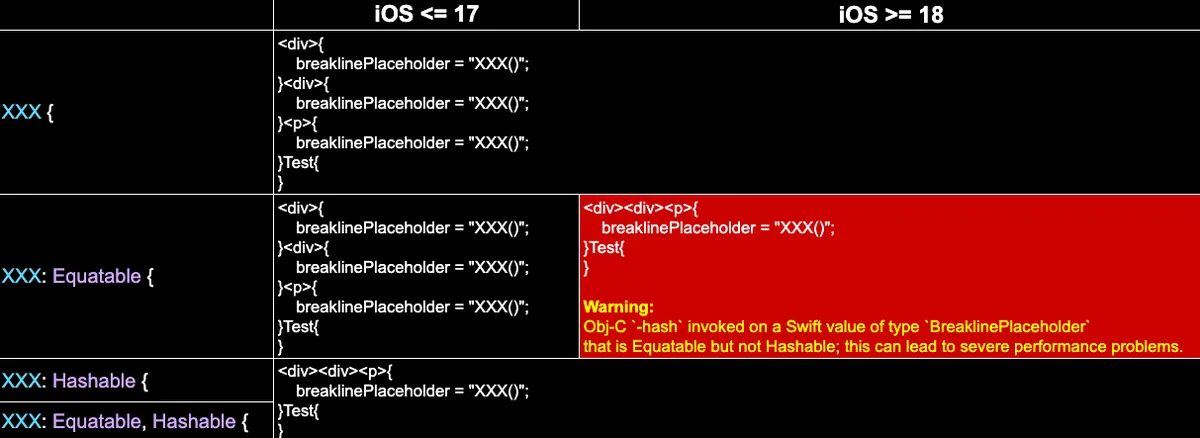
iOS 17/18でEquatable/Hashableの実装有無による違い比較
⭐️⭐️ iOS 18以降は
Equatableも参照しますが、iOS 17以前は参照しません。⭐️⭐️
前述を踏まえると、NSAttributedString attributes: [NSAttributedString.Key: Any?] の Value オブジェクトは Any? 型で宣言されており、観測結果から、iOS 18 以降はまず Equatable を参照して同一かどうかを判断し、その後に Hashable の Set を使ってオブジェクトを統合管理しています。
結論
NSAttributedString attributes: [NSAttributedString.Key: Any?] の Range 属性をマージする際、iOS 18以降は Equatable も参照するようになり、これまでの挙動と異なります。
また、iOS 18 からは Equatable のみを宣言している場合、XCode コンソールに警告が表示されます:
Obj-C の
-hashは Equatable ですが、Hashable ではない Swift 型BreaklinePlaceholderの値に対して呼び出されました。これにより深刻なパフォーマンス問題が発生する可能性があります。
Post は Medium から ZMediumToMarkdown によって変換されました。



コメント