iOS 18以降のNSAttributedString属性範囲合併:Equatable基準の行動変化|開発者必見
iOS 18からNSAttributedStringの属性範囲合併がEquatable準拠に変わり、属性管理の精度が向上。開発者が直面する属性競合問題を解決し、UI表現の一貫性を実現する方法を解説します。
本記事は AI による翻訳をもとに作成されています。表現が不自然な箇所がありましたら、ぜひコメントでお知らせください。
記事一覧
iOS ≥ 18 NSAttributedString attributes Range の結合に関する動作変更
iOS ≥ 18 から NSAttributedString の属性レンジの結合は Equatable を参照するようになりました
{:target="_blank"}](/assets/9e43897d99fc/1*PJ_qm75Yz_7y0UUBk8X6bg.webp)
写真提供:C M
問題の原因
iOS 18 が2024年9月17日にリリースされた後、以前作成したオープンソースプロジェクト ZMarkupParser にて、iOS 18で一部のHTML解析時にクラッシュが発生するとの報告がありました。
この Issue を見て少し混乱しました。以前は問題なかったのに、iOS 18 からクラッシュするようになったのは理屈に合いません。おそらく iOS 18 の Foundation の内部に何か変更があったためだと思います。
クラッシュトレース
Trace Code 後定位したクラッシュ問題の箇所は、.breaklinePlaceholder 属性を走査し、Range に対して削除操作を行う際にクラッシュが発生することです:
1
2
3
4
5
6
mutableAttributedString.enumerateAttribute(.breaklinePlaceholder, in: NSMakeRange(0, NSMakeRange(0, mutableAttributedString.string.utf16.count))) { value, range, _ in
  // ...条件分岐...
  // mutableAttributedString.deleteCharacters(in: preRange)
  // ...条件分岐...
  // mutableAttributedString.deleteCharacters(in: range)
}
.breaklinePlaceholder は私が独自に拡張した NSAttributedString.Key で、HTML タグ情報をマークし、改行文字の使用を最適化するためのものです:
1
2
3
4
5
6
7
8
9
10
11
struct BreaklinePlaceholder: OptionSet {
    let rawValue: Int

    static let tagBoundaryPrefix = BreaklinePlaceholder(rawValue: 1)
    static let tagBoundarySuffix = BreaklinePlaceholder(rawValue: 2)
    static let breaklineTag = BreaklinePlaceholder(rawValue: 3)
}

extension NSAttributedString.Key {
    static let breaklinePlaceholder: NSAttributedString.Key = .init("breaklinePlaceholder")
}
しかし、核心の問題はここではありません 。なぜなら、iOS 17以前では入力された
mutableAttributedStringは上記の操作を実行しても問題がなかったからです;つまり、iOS 18で入力データの内容が変わっていることを意味します。
NSAttributedString attributes: [NSAttributedString.Key: Any?]
問題を深掘りする前に、NSAttributedString の属性の結合メカニズムについて紹介します。
NSAttributedString attributes は 同じ .key を持つ隣接する Range の Attributes オブジェクトが同一か自動的に比較され、同一であれば同じ Attribute に結合されます。例えば:
1
2
3
4
5
let mutableAttributedString = NSMutableAttributedString(string: "", attributes: nil)
mutableAttributedString.append(NSAttributedString(string: "<div>", attributes: [.font: UIFont.systemFont(ofSize: 14)]))
mutableAttributedString.append(NSAttributedString(string: "<div>", attributes: [.font: UIFont.systemFont(ofSize: 14)]))
mutableAttributedString.append(NSAttributedString(string: "<p>", attributes: [.font: UIFont.systemFont(ofSize: 14)]))
mutableAttributedString.append(NSAttributedString(string: "Test", attributes: [.font: UIFont.systemFont(ofSize: 12)]))
最終的な Attributes の結合結果:
1
2
3
4
5
<div><div><p>{
    NSFont = "<UICTFont: 0x101d13400> font-family: \".SFUI-Regular\"; font-weight: normal; font-style: normal; font-size: 14.00pt";
}Test{
    NSFont = "<UICTFont: 0x101d13860> font-family: \".SFUI-Regular\"; font-weight: normal; font-style: normal; font-size: 12.00pt";
}
enumerateAttribute(.breaklinePlaceholder...) を実行すると、以下の結果が得られます:
1
2
NSRange {0, 13}: <UICTFont: 0x101d13400> font-family: ".SFUI-Regular"; font-weight: normal; font-style: normal; font-size: 14.00pt
NSRange {13, 4}: <UICTFont: 0x101d13860> font-family: ".SFUI-Regular"; font-weight: normal; font-style: normal; font-size: 12.00pt
NSAttributedString attributes の結合 — 基盤実装の推測
推測内部では Set<Hashable> を Attributes コンテナとして使用しており、同じ Attribute オブジェクトを自動的に除外している可能性があります。
しかし利便性のために、NSAttributedString attributes: [NSAttributedString.Key: Any?] の値オブジェクトは Any? 型で宣言されており、Hashable の制約はありません。
そのため、システムは内部で as? Hashable に準拠し、Set を使ってオブジェクトを統合・管理していると推測されます。
今回の iOS 18以降の調整差異は、ここにある基盤の実装問題が原因と推測されます。
以下は私たちがカスタムした .breaklinePlaceholder Attributes の例です:
1
2
3
4
5
6
7
8
9
10
11
12
13
14
15
16
17
18
19
struct BreaklinePlaceholder: Equatable {
    let rawValue: Int

    static let tagBoundaryPrefix = BreaklinePlaceholder(rawValue: 1)
    static let tagBoundarySuffix = BreaklinePlaceholder(rawValue: 2)
    static let breaklineTag = BreaklinePlaceholder(rawValue: 3)
}

extension NSAttributedString.Key {
    static let breaklinePlaceholder: NSAttributedString.Key = .init("breaklinePlaceholder")
}

//

let mutableAttributedString = NSMutableAttributedString(string: "", attributes: nil)
mutableAttributedString.append(NSAttributedString(string: "<div>", attributes: [.breaklinePlaceholder: NSAttributedString.Key.BreaklinePlaceholder.tagBoundaryPrefix]))
mutableAttributedString.append(NSAttributedString(string: "<div>", attributes: [.breaklinePlaceholder: NSAttributedString.Key.BreaklinePlaceholder.tagBoundaryPrefix]))
mutableAttributedString.append(NSAttributedString(string: "<p>", attributes: [.breaklinePlaceholder: NSAttributedString.Key.BreaklinePlaceholder.tagBoundaryPrefix]))
mutableAttributedString.append(NSAttributedString(string: "Test", attributes: nil))
iOS ≤ 17 では以下の Attributes の結合結果 が得られます:
1
2
3
4
5
6
7
8
<div>{
    breaklinePlaceholder = "NSAttributedStringCrash.BreaklinePlaceholder(rawValue: 1)";
}<div>{
    breaklinePlaceholder = "NSAttributedStringCrash.BreaklinePlaceholder(rawValue: 1)";
}<p>{
    breaklinePlaceholder = "NSAttributedStringCrash.BreaklinePlaceholder(rawValue: 1)";
}Test{
}
iOS ≥ 18 では以下の Attributes の結合結果が得られます:
1
2
3
4
<div><div><p>{
    breaklinePlaceholder = "NSAttributedStringCrash.BreaklinePlaceholder(rawValue: 1)";
}Test{
}
同じプログラムでもiOSのバージョンによって結果が異なることが確認され、これが最終的に
enumerateAttribute(.breaklinePlaceholder..)の処理ロジックに予期しない影響を与え、クラッシュを引き起こしました。
⭐️ iOS ≥ 18 NSAttributedString attributes: [NSAttributedString.Key: Any?] は Equatable == を参照するようになります⭐️
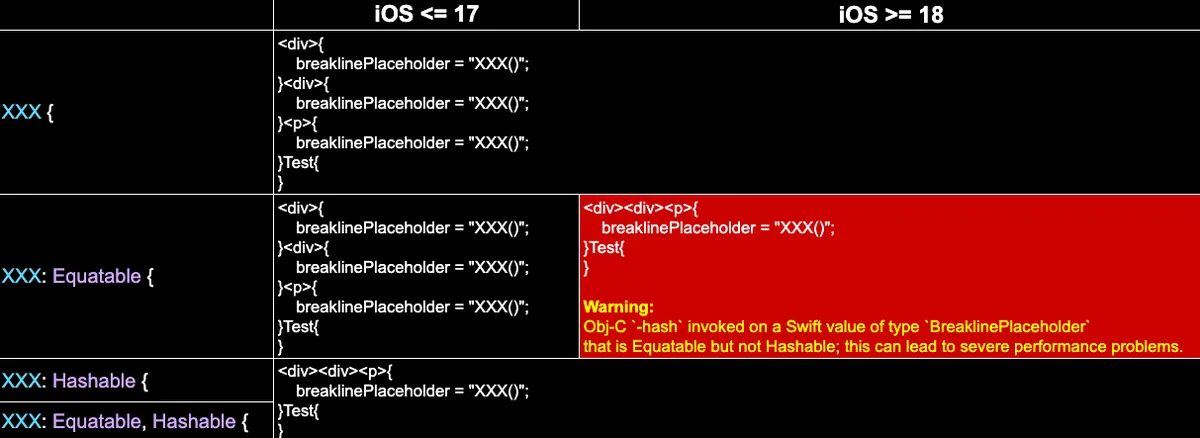
iOS 17/18でEquatable/Hashableが実装されているかどうかの比較結果
⭐️⭐️ iOS 18以降は
Equatableを参照しますが、iOS 17以前は参照しません。⭐️⭐️
前述を踏まえると、NSAttributedString attributes: [NSAttributedString.Key: Any?] の値オブジェクトは Any? 型で宣言されており、観察結果として iOS 18 以降ではまず Equatable を参照して同一かどうかを判断し、その後 Hashable の Set を使ってオブジェクトを統合管理します。
結論
NSAttributedString attributes: [NSAttributedString.Key: Any?] は Range Attribute をマージする際、iOS 18以降では Equatable を参照するようになり、これまでとは異なります。
また、iOS 18 からは Equatable のみを宣言した場合、Xcode コンソールに警告が表示されます:
Obj-C
-hashは Equatable ですが、Hashable ではない Swift 型BreaklinePlaceholderの値に対して呼び出されました。これにより重大なパフォーマンス問題が発生する可能性があります。
ご質問やご意見がありましたら、こちらからご連絡ください 。
Post は Medium から ZMediumToMarkdown によって変換されました。
本記事は Medium にて初公開されました(こちらからオリジナル版を確認)。ZMediumToMarkdown による自動変換・同期技術を使用しています。