
Google Apps Script を使って3ステップで無料で Github リポジトリスター通知を作成する方法
GAS で Github Webhook を連携し、スターの通知を Line に転送する方法
はじめに
オープンソースプロジェクトのメンテナとして、お金や名声のためではなく、ただ一つの虚栄心のために;新しい⭐️スターを見かけるたびに、心の中で密かに喜びを感じる;時間と労力をかけて作ったプロジェクトが、本当に誰かに使われ、本当に同じ問題を持つ仲間の役に立っていると実感する。
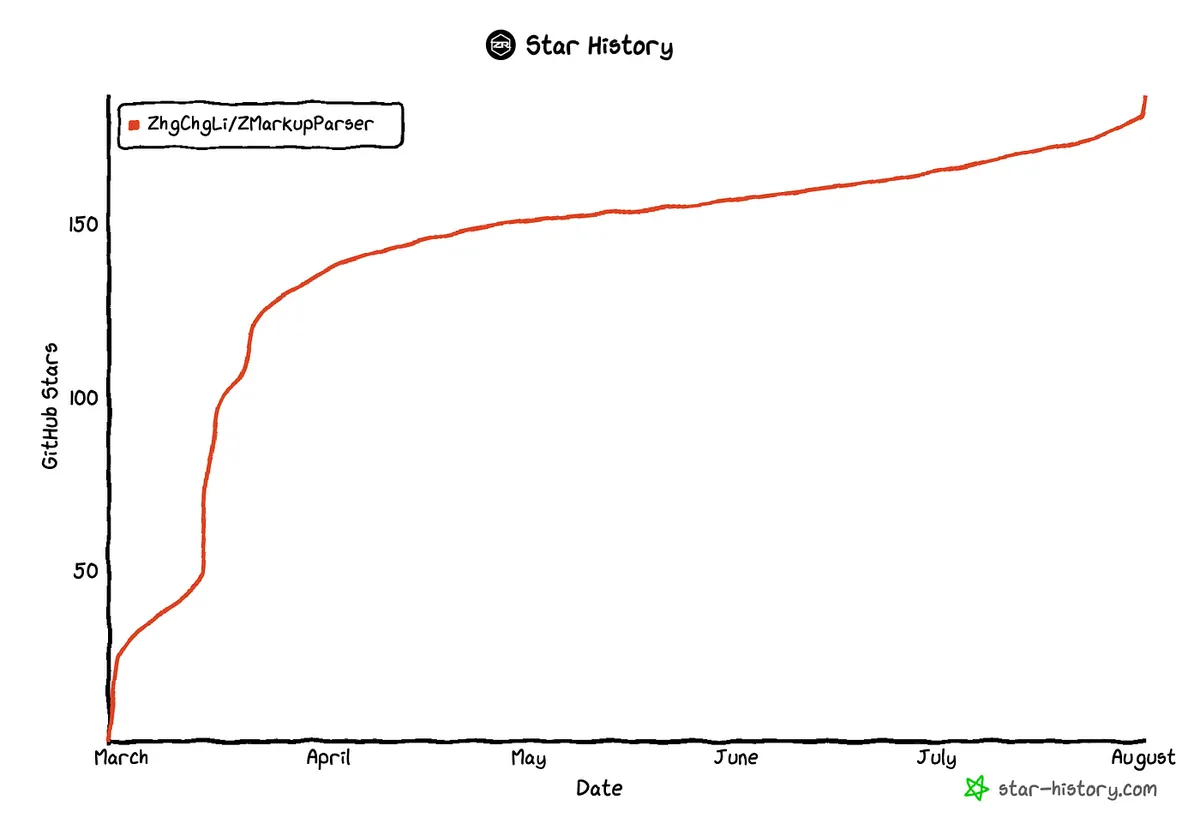
そのため、⭐️スターの観察には少し強迫観念があり、時々Githubをチェックして⭐️スターの数が増えているか確認してしまいます。そこで、誰かが⭐️スターを押したときに自動で通知が届くような、もっと能動的な方法はないかと考えました。手動で追跡や確認をする必要がありません。
既存のツール
まず既存のツールを探すことを考え、Github Marketplaceで検索してみると、いくつかの優れたツールがありました。
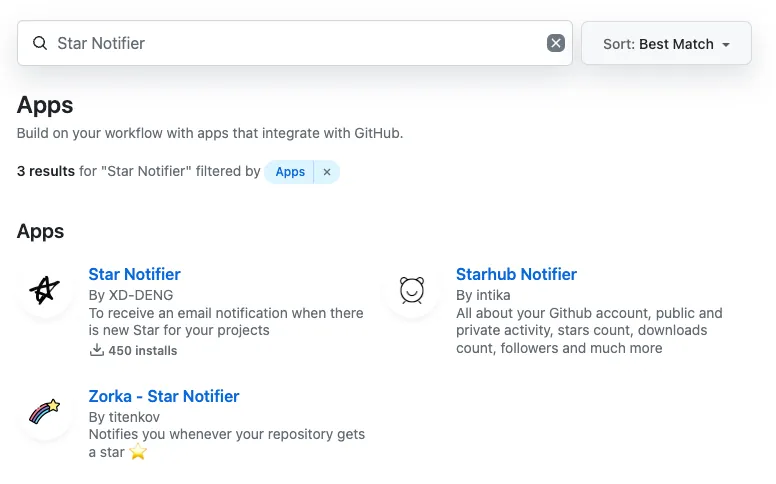
いくつか試しましたが、期待通りの効果が得られませんでした。中にはもう動作していないものや、5/10/20 個の⭐️スターがついた時にしか通知が送られないものもあります(私は小規模なので、⭐️が1つでもとても嬉しいです😝)。また、通知はメールのみで、SNSでの通知が欲しいです。
さらに、「見栄」のためだけにアプリを作るのは、心配で安心できず、セキュリティリスクがあるのではないかと感じています。
iOS 上の Github アプリや GitTrends などのサードパーティ製アプリもこの機能をサポートしていません。
自分で作る Github Repo Star Notifier
以上を踏まえて、実は Google Apps Script を使って無料かつ迅速に自分の Github リポジトリのスター通知システムを作成できます。
2024/10/12 更新
⚠️⚠️⚠️
Line Notify は 2025/04/01 にサービス終了 するため、私の最新記事「10 分で簡単に Line Notify から Telegram Bot 通知へ移行する方法」 を参考に、Telegram での通知連携に切り替えてください。
準備作業
本文は Line を通知手段として使用していますが、他のメッセージアプリで通知したい場合は ChatGPT に実現方法を問い合わせてください。
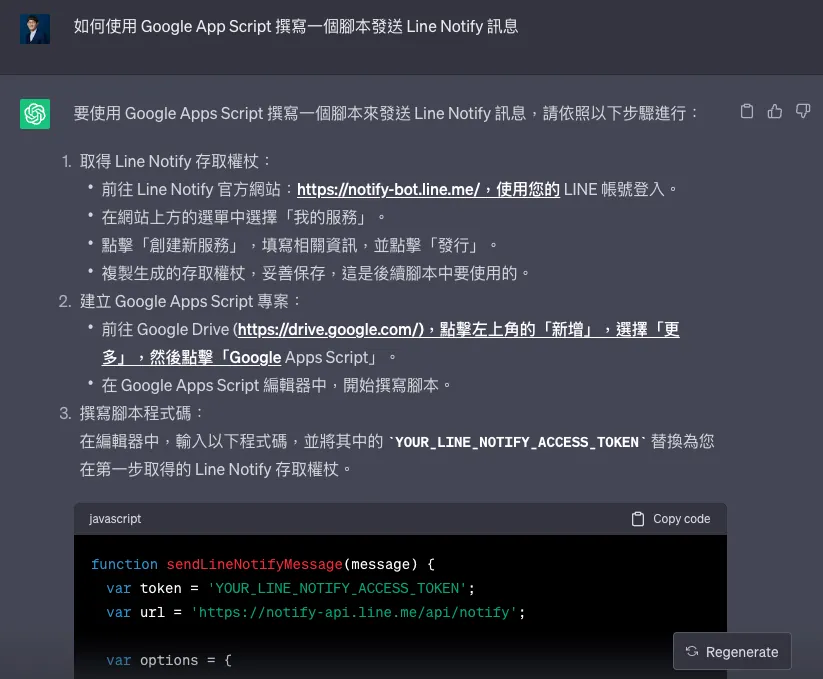
ChatGPT に Line Notify の実装方法を問い合わせる
lineToken :
-
Line Notify にアクセスしてください。
-
Lineアカウントにログインした後、下にスクロールして「Generate access token (For developers)」セクションを見つけてください。
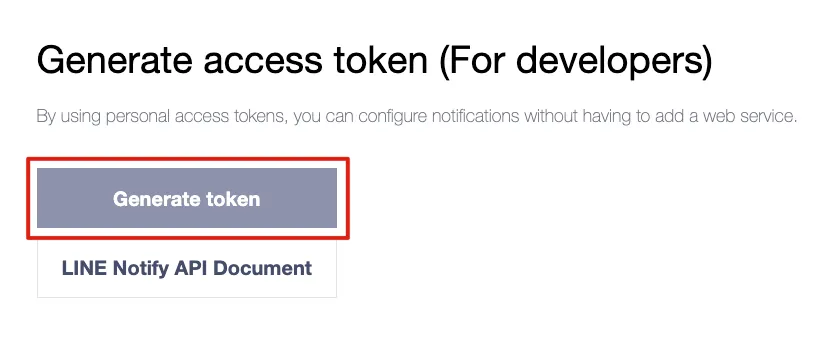
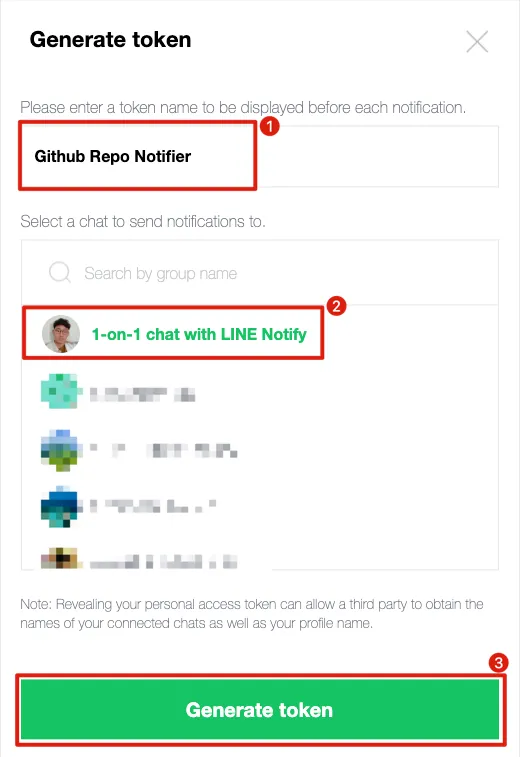
- 「Generate token」をクリックしてください
-
Token Name:希望するボットの名前を入力してください。メッセージの前に表示されます(例:
Github Repo Notifer: XXXX) -
送信先の選択:私は「1-on-1 chat with LINE Notify」を選び、LINE Notify公式ボットを通じて自分にメッセージを送信します。
-
「Generate token」をクリックしてください
-
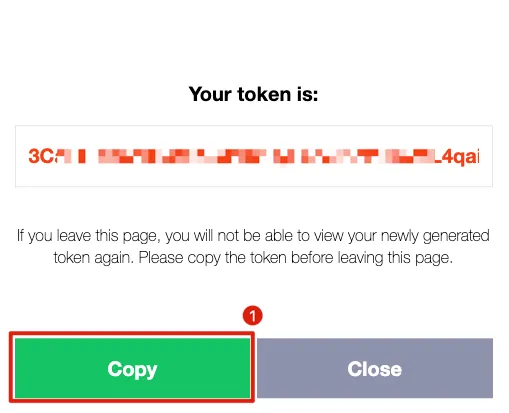
「コピー」を選択してください
-
そしてトークンを必ず控えてください。後で忘れた場合は再発行が必要で、再度確認することはできません。
githubWebhookSecret :
- Random.org にアクセスして、ランダムな文字列を生成してください。
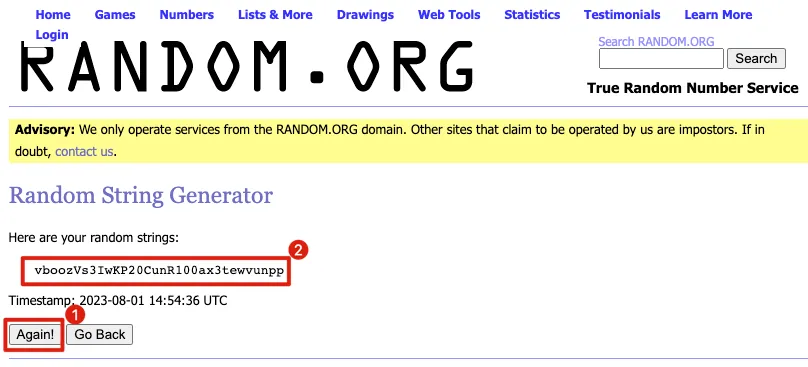
- コピーしてこのランダムな文字列をメモしてください
この文字列を Github Webhook と Google Apps Script 間のリクエスト検証の媒介として使用します。
GASの制限により、
doPost(e)でHeadersの内容を取得できません。そのため、Github Webhookの標準の認証方法は使えず、手動で?secret=クエリを使った文字列マッチ認証のみ可能です。
Google Apps Script を作成する
Google Apps Script にアクセスし、左上の「+ 新しいプロジェクト」をクリックします。
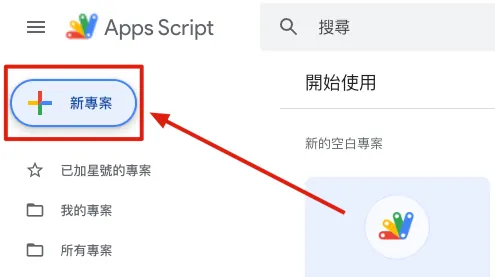
左上の「無題のプロジェクト」をクリックして、プロジェクト名を変更します。
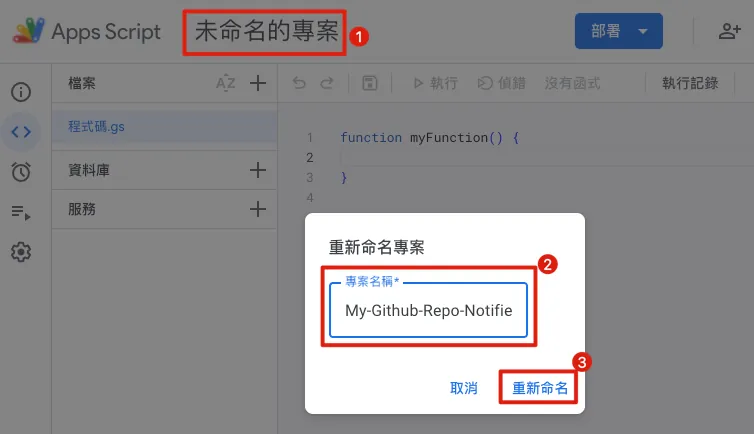
こちらではプロジェクト名を My-Github-Repo-Notifier としました。今後の識別に便利です。
コード入力エリア:
// 定数変数
const lineToken = 'XXXX';
// 自分のLine Notifyボットトークンを生成:https://notify-bot.line.me/my/
const githubWebhookSecret = "XXXXX";
// 自分のシークレット文字列を生成:https://www.random.org/strings/?num=1&len=32&digits=on&upperalpha=on&loweralpha=on&unique=on&format=html&rnd=new

// HTTP Get/Post ハンドラー
// Getメソッドは許可しない
function doGet(e) {
  return HtmlService.createHtmlOutput("Access Denied!");
}

// Github WebhookはPostメソッドで受信
function doPost(e) {
  const content = JSON.parse(e.postData.contents);

  // セキュリティチェック、リクエストがGithub Webhookからのものか確認
  if (verifyGitHubWebhook(e) == false) {
    return HtmlService.createHtmlOutput("Access Denied!");
  }

  // starイベントのペイロード content["action"] == "started"
  if(content["action"] != "started") {
    return HtmlService.createHtmlOutput("OK!");
  }

  // メッセージを作成
  const message = makeMessageString(content);

  // メッセージ送信、SlackやTelegramにも変更可能
  sendLineNotifyMessage(message);

  return HtmlService.createHtmlOutput("OK!");
}

// メソッド
// メッセージ内容を作成
function makeMessageString(content) {
  const repository = content["repository"];
  const repositoryName = repository["name"];
  const repositoryURL = repository["svn_url"];
  const starsCount = repository["stargazers_count"];
  const forksCount = repository["forks_count"];

  const starrer = content["sender"]["login"];

  var message = "🎉🎉「"+starrer+"」が「"+repositoryName+"」リポジトリにスターをつけました 🎉🎉\n";
  message += "現在のスター数: "+starsCount+"\n";
  message += "現在のフォーク数: "+forksCount+"\n";
  message += repositoryURL;

  return message;
}

// リクエストがGithub Webhookからのものか検証
// GASの制限により (https://issuetracker.google.com/issues/67764685?pli=1)
// ヘッダー内容を取得できない
// そのためGithub Webhookの標準検証方法 (https://docs.github.com/en/webhooks-and-events/webhooks/securing-your-webhooks)
// は使えず、?secret=XXXで手動マッチング検証のみ可能
function verifyGitHubWebhook(e) {
  if (e.parameter["secret"] === githubWebhookSecret) {
    return true
  } else {
    return false
  }
}

// -- メッセージ送信 --
// Line
// 他の送信方法はChatGPTに問い合わせ可能
function sendLineNotifyMessage(message) {
  var url = 'https://notify-api.line.me/api/notify';

  var options = {
    method: 'post',
    headers: {
      'Authorization': 'Bearer '+lineToken
    },
    payload: {
      'message': message
    }
  };
  UrlFetchApp.fetch(url, options);
}
lineToken と githubWebhookSecret に前のステップでコピーした値を設定します。
補足 Github Webhookで誰かがStarを押したときに送られてくるデータは以下の通りです:
{
  "action": "created",
  "starred_at": "2023-08-01T03:42:26Z",
  "repository": {
    "id": 602927147,
    "node_id": "R_kgDOI-_wKw",
    "name": "ZMarkupParser",
    "full_name": "ZhgChgLi/ZMarkupParser",
    "private": false,
    "owner": {
      "login": "ZhgChgLi",
      "id": 83232222,
      "node_id": "MDEyOk9yZ2FuaXphdGlvbjgzMjMyMjIy",
      "avatar_url": "https://avatars.githubusercontent.com/u/83232222?v=4",
      "gravatar_id": "",
      "url": "https://api.github.com/users/ZhgChgLi",
      "html_url": "https://github.com/ZhgChgLi",
      "followers_url": "https://api.github.com/users/ZhgChgLi/followers",
      "following_url": "https://api.github.com/users/ZhgChgLi/following{/other_user}",
      "gists_url": "https://api.github.com/users/ZhgChgLi/gists{/gist_id}",
      "starred_url": "https://api.github.com/users/ZhgChgLi/starred{/owner}{/repo}",
      "subscriptions_url": "https://api.github.com/users/ZhgChgLi/subscriptions",
      "organizations_url": "https://api.github.com/users/ZhgChgLi/orgs",
      "repos_url": "https://api.github.com/users/ZhgChgLi/repos",
      "events_url": "https://api.github.com/users/ZhgChgLi/events{/privacy}",
      "received_events_url": "https://api.github.com/users/ZhgChgLi/received_events",
      "type": "Organization",
      "site_admin": false
    },
    "html_url": "https://github.com/ZhgChgLi/ZMarkupParser",
    "description": "ZMarkupParserは、HTML文字列をカスタマイズ可能なスタイルとタグでNSAttributedStringに変換する純粋なSwiftライブラリです。",
    "fork": false,
    "url": "https://api.github.com/repos/ZhgChgLi/ZMarkupParser",
    "forks_url": "https://api.github.com/repos/ZhgChgLi/ZMarkupParser/forks",
    "keys_url": "https://api.github.com/repos/ZhgChgLi/ZMarkupParser/keys{/key_id}",
    "collaborators_url": "https://api.github.com/repos/ZhgChgLi/ZMarkupParser/collaborators{/collaborator}",
    "teams_url": "https://api.github.com/repos/ZhgChgLi/ZMarkupParser/teams",
    "hooks_url": "https://api.github.com/repos/ZhgChgLi/ZMarkupParser/hooks",
    "issue_events_url": "https://api.github.com/repos/ZhgChgLi/ZMarkupParser/issues/events{/number}",
    "events_url": "https://api.github.com/repos/ZhgChgLi/ZMarkupParser/events",
    "assignees_url": "https://api.github.com/repos/ZhgChgLi/ZMarkupParser/assignees{/user}",
    "branches_url": "https://api.github.com/repos/ZhgChgLi/ZMarkupParser/branches{/branch}",
    "tags_url": "https://api.github.com/repos/ZhgChgLi/ZMarkupParser/tags",
    "blobs_url": "https://api.github.com/repos/ZhgChgLi/ZMarkupParser/git/blobs{/sha}",
    "git_tags_url": "https://api.github.com/repos/ZhgChgLi/ZMarkupParser/git/tags{/sha}",
    "git_refs_url": "https://api.github.com/repos/ZhgChgLi/ZMarkupParser/git/refs{/sha}",
    "trees_url": "https://api.github.com/repos/ZhgChgLi/ZMarkupParser/git/trees{/sha}",
    "statuses_url": "https://api.github.com/repos/ZhgChgLi/ZMarkupParser/statuses/{sha}",
    "languages_url": "https://api.github.com/repos/ZhgChgLi/ZMarkupParser/languages",
    "stargazers_url": "https://api.github.com/repos/ZhgChgLi/ZMarkupParser/stargazers",
    "contributors_url": "https://api.github.com/repos/ZhgChgLi/ZMarkupParser/contributors",
    "subscribers_url": "https://api.github.com/repos/ZhgChgLi/ZMarkupParser/subscribers",
    "subscription_url": "https://api.github.com/repos/ZhgChgLi/ZMarkupParser/subscription",
    "commits_url": "https://api.github.com/repos/ZhgChgLi/ZMarkupParser/commits{/sha}",
    "git_commits_url": "https://api.github.com/repos/ZhgChgLi/ZMarkupParser/git/commits{/sha}",
    "comments_url": "https://api.github.com/repos/ZhgChgLi/ZMarkupParser/comments{/number}",
    "issue_comment_url": "https://api.github.com/repos/ZhgChgLi/ZMarkupParser/issues/comments{/number}",
    "contents_url": "https://api.github.com/repos/ZhgChgLi/ZMarkupParser/contents/{+path}",
    "compare_url": "https://api.github.com/repos/ZhgChgLi/ZMarkupParser/compare/{base}...{head}",
    "merges_url": "https://api.github.com/repos/ZhgChgLi/ZMarkupParser/merges",
    "archive_url": "https://api.github.com/repos/ZhgChgLi/ZMarkupParser/{archive_format}{/ref}",
    "downloads_url": "https://api.github.com/repos/ZhgChgLi/ZMarkupParser/downloads",
    "issues_url": "https://api.github.com/repos/ZhgChgLi/ZMarkupParser/issues{/number}",
    "pulls_url": "https://api.github.com/repos/ZhgChgLi/ZMarkupParser/pulls{/number}",
    "milestones_url": "https://api.github.com/repos/ZhgChgLi/ZMarkupParser/milestones{/number}",
    "notifications_url": "https://api.github.com/repos/ZhgChgLi/ZMarkupParser/notifications{?since,all,participating}",
    "labels_url": "https://api.github.com/repos/ZhgChgLi/ZMarkupParser/labels{/name}",
    "releases_url": "https://api.github.com/repos/ZhgChgLi/ZMarkupParser/releases{/id}",
    "deployments_url": "https://api.github.com/repos/ZhgChgLi/ZMarkupParser/deployments",
    "created_at": "2023-02-17T08:41:37Z",
    "updated_at": "2023-08-01T03:42:27Z",
    "pushed_at": "2023-08-01T00:07:41Z",
    "git_url": "git://github.com/ZhgChgLi/ZMarkupParser.git",
    "ssh_url": "[email protected]:ZhgChgLi/ZMarkupParser.git",
    "clone_url": "https://github.com/ZhgChgLi/ZMarkupParser.git",
    "svn_url": "https://github.com/ZhgChgLi/ZMarkupParser",
    "homepage": "https://zhgchg.li",
    "size": 27449,
    "stargazers_count": 187,
    "watchers_count": 187,
    "language": "Swift",
    "has_issues": true,
    "has_projects": true,
    "has_downloads": true,
    "has_wiki": true,
    "has_pages": false,
    "has_discussions": false,
    "forks_count": 10,
    "mirror_url": null,
    "archived": false,
    "disabled": false,
    "open_issues_count": 2,
    "license": {
      "key": "mit",
      "name": "MITライセンス",
      "spdx_id": "MIT",
      "url": "https://api.github.com/licenses/mit",
      "node_id": "MDc6TGljZW5zZTEz"
    },
    "allow_forking": true,
    "is_template": false,
    "web_commit_signoff_required": false,
    "topics": [
      "cocoapods",
      "html",
      "html-converter",
      "html-parser",
      "html-renderer",
      "ios",
      "nsattributedstring",
      "swift",
      "swift-package",
      "textfield",
      "uikit",
      "uilabel",
      "uitextview"
    ],
    "visibility": "public",
    "forks": 10,
    "open_issues": 2,
    "watchers": 187,
    "default_branch": "main"
  },
  "organization": {
    "login": "ZhgChgLi",
    "id": 83232222,
    "node_id": "MDEyOk9yZ2FuaXphdGlvbjgzMjMyMjIy",
    "url": "https://api.github.com/orgs/ZhgChgLi",
    "repos_url": "https://api.github.com/orgs/ZhgChgLi/repos",
    "events_url": "https://api.github.com/orgs/ZhgChgLi/events",
    "hooks_url": "https://api.github.com/orgs/ZhgChgLi/hooks",
    "issues_url": "https://api.github.com/orgs/ZhgChgLi/issues",
    "members_url": "https://api.github.com/orgs/ZhgChgLi/members{/member}",
    "public_members_url": "https://api.github.com/orgs/ZhgChgLi/public_members{/member}",
    "avatar_url": "https://avatars.githubusercontent.com/u/83232222?v=4",
    "description": "より良い世界を共に築く。"
  },
  "sender": {
    "login": "zhgtest",
    "id": 4601621,
    "node_id": "MDQ6VXNlcjQ2MDE2MjE=",
    "avatar_url": "https://avatars.githubusercontent.com/u/4601621?v=4",
    "gravatar_id": "",
    "url": "https://api.github.com/users/zhgtest",
    "html_url": "https://github.com/zhgtest",
    "followers_url": "https://api.github.com/users/zhgtest/followers",
    "following_url": "https://api.github.com/users/zhgtest/following{/other_user}",
    "gists_url": "https://api.github.com/users/zhgtest/gists{/gist_id}",
    "starred_url": "https://api.github.com/users/zhgtest/starred{/owner}{/repo}",
    "subscriptions_url": "https://api.github.com/users/zhgtest/subscriptions",
    "organizations_url": "https://api.github.com/users/zhgtest/orgs",
    "repos_url": "https://api.github.com/users/zhgtest/repos",
    "events_url": "https://api.github.com/users/zhgtest/events{/privacy}",
    "received_events_url": "https://api.github.com/users/zhgtest/received_events",
    "type": "User",
    "site_admin": false
  }
}
デプロイ
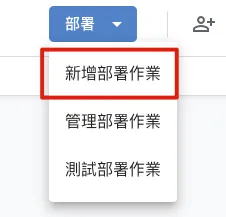
プログラムの作成が完了したら、右上の「デプロイ」→「新しいデプロイを追加」をクリックしてください:
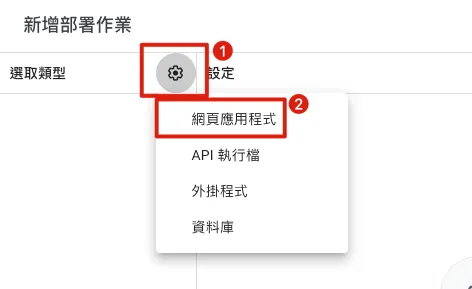
左側でタイプを「ウェブアプリケーション」に選択します:
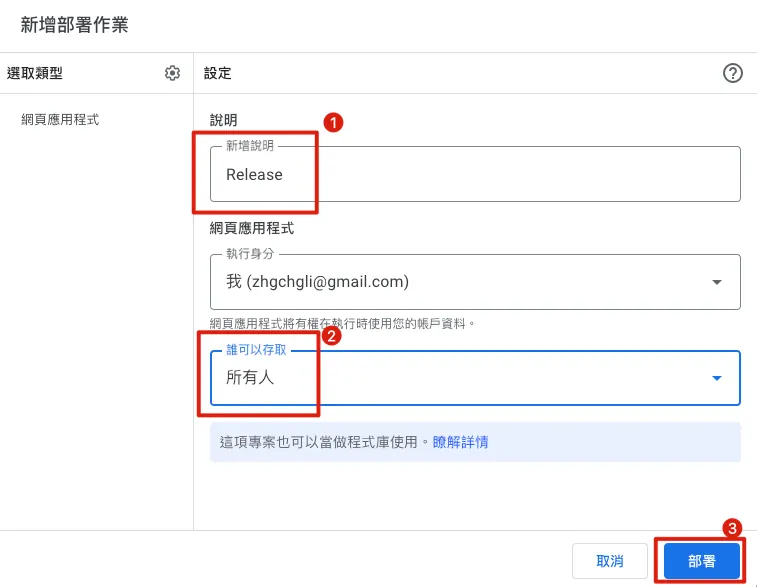
-
追加説明:自由に入力してください。私は「
Release」と入力します。 -
誰がアクセスできますか: 「
すべてのユーザー」に変更してください -
「デプロイ」をクリックしてください
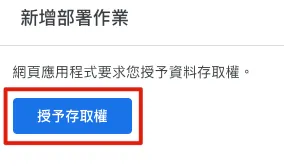
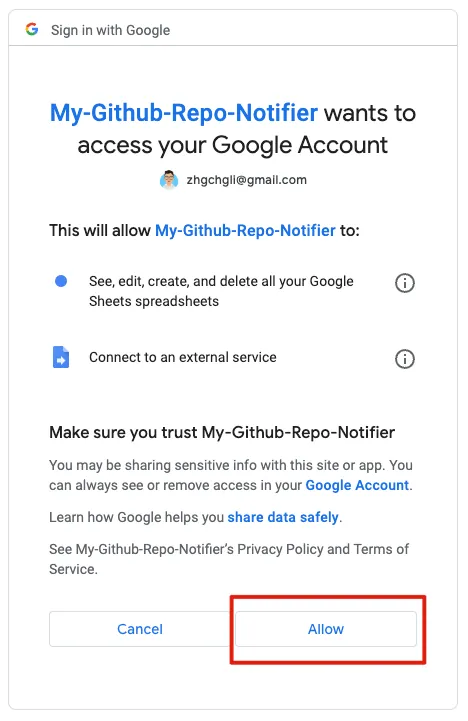
初回のデプロイ時は、「アクセス権を付与」をクリックする必要があります:
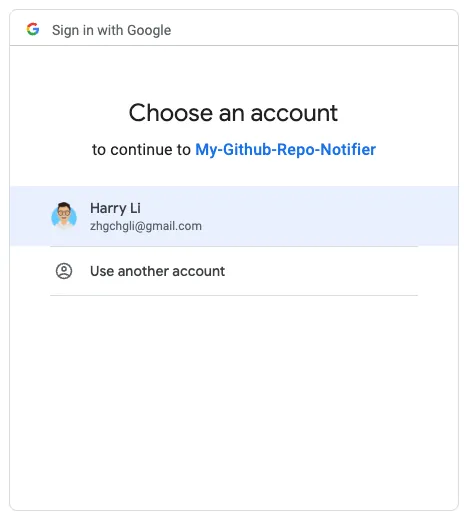
アカウント選択のポップアップが表示されたら、現在使用している Gmail アカウントを選択してください:
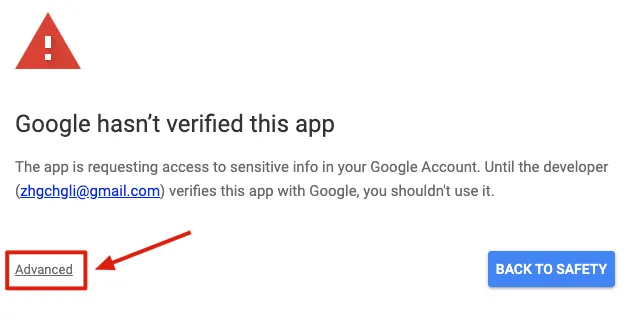
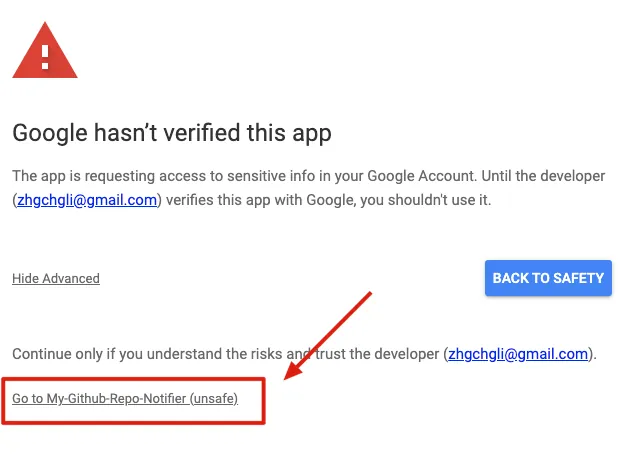
「Google hasn’t verified this app」が表示されるのは、開発するアプリが自分用であり、Googleの認証を必要としないためです。
「Advanced」→「XXX に移動(安全ではありません)」→「許可」をクリックしてください:
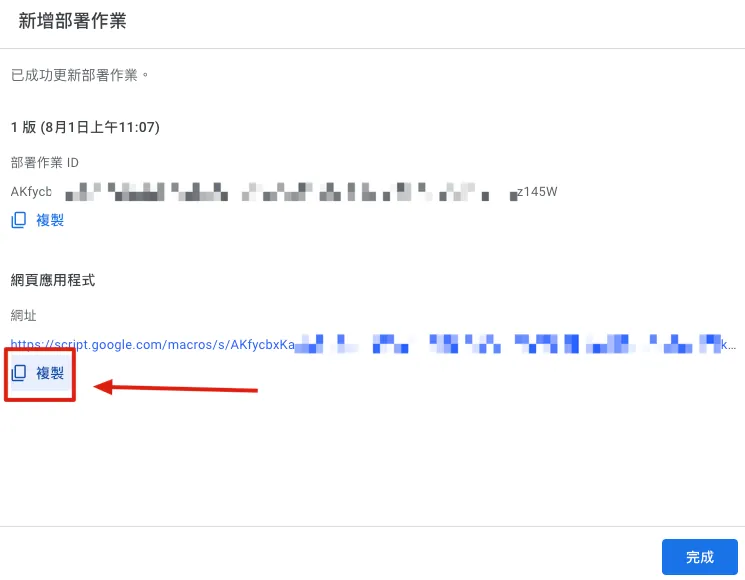
デプロイ完了後、結果ページの「ウェブアプリケーション」で Request URL を取得し、「コピー」をクリックしてこの GAS の URL を控えてください。
⚠️️️ 余談ですが、コードを変更した場合はデプロイを更新しないと反映されませんのでご注意ください⚠️
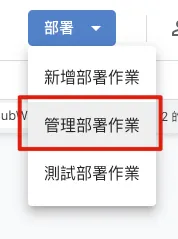
変更したコードを有効にするには、同様に右上の「デプロイ」->「デプロイの管理」->右上の「✏️」を選択->バージョンで「新しいバージョンを作成」->「デプロイ」をクリックしてください。
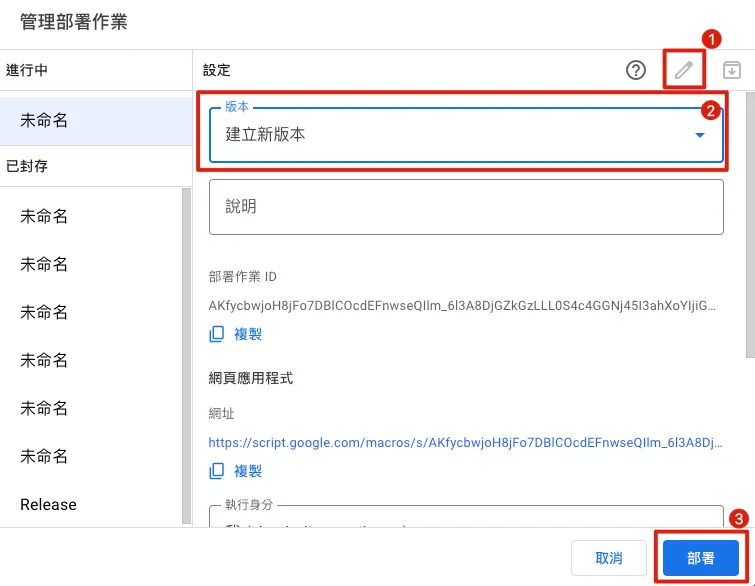
これでコードの更新とデプロイが完了します。
Github Webhook 設定
-
Githubに戻る Github
-
Organizations(その中のすべてのリポジトリ)または単一のリポジトリにWebhookを設定して、新しい⭐️スターを監視できます。
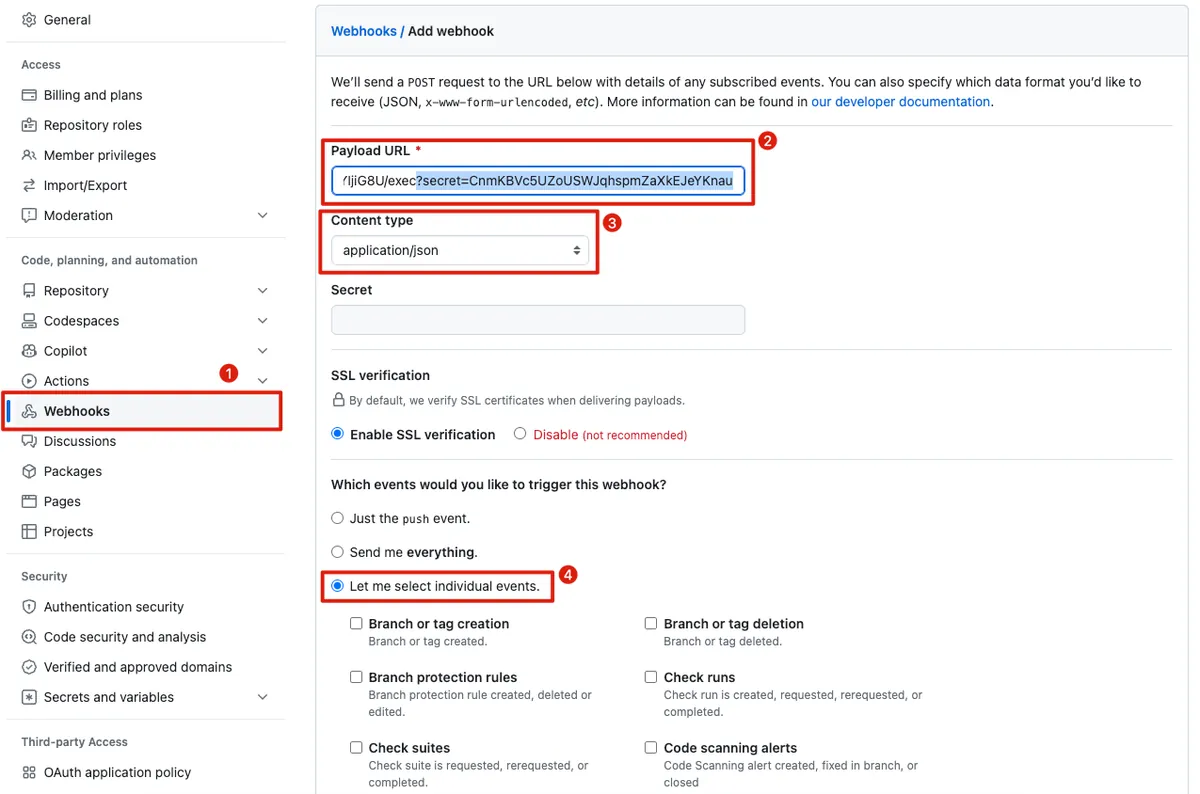
Organizations / Repo に入り、「Settings」→ 左側の「Webhooks」を見つけ、「Add webhook」をクリック:
-
Payload URL :
GAS の URLを入力し、URL の後ろに自分のセキュリティ検証文字列?secret=githubWebhookSecretを手動で追加します。
例えば、あなたのGAS の URLがhttps://script.google.com/macros/s/XXX/execで、githubWebhookSecretが123456の場合、URL は以下のようになります:https://script.google.com/macros/s/XXX/exec?secret=123456。 -
Content type:
application/jsonを選択してください -
Which events would you like to trigger this webhook?
「Let me select individual events.」を選択してください
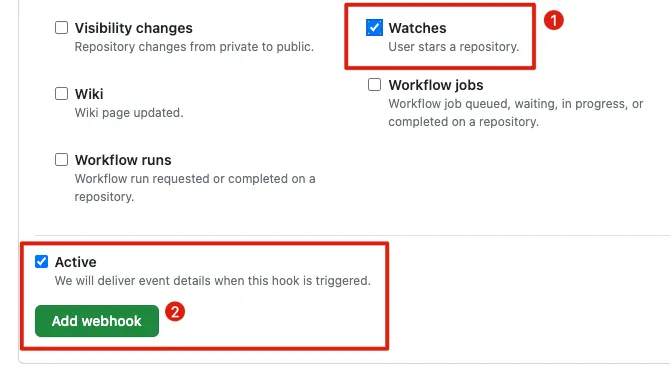
⚠️「Pushes」のチェックを外してください
️️️️⚠️「Watches」にチェックを入れてください。ただし「Stars」ではありません(ただし Stars もスターのクリック状態を監視するイベントなので、Stars を使う場合は GAS の action 判定も調整が必要です) -
「
Active」を選択してください -
「Add webhook」をクリックしてください
-
設定完了
🚀テスト
設定した Organizations のリポジトリ / リポジトリで「Star」をクリックするか、一度 un-star してから再度「Star」をクリックしてください:

プッシュ通知が届きます!
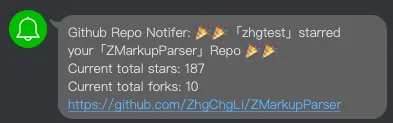
お疲れ様でした!🎉🎉🎉🎉
広告
Post Mediumから変換されたもの by ZMediumToMarkdown.



コメント